VoxAI

Redesigning Proloquo with AI

Role

UX Researcher

UI Designer

Timeline

April 2024 – May 2024

(6 weeks)

Team

Lois Kim

Thanh Quach

Joseph Sotelo

Birgess Weston

My Responsibilities

UX/UI Design

Visual System

UX Research

Design Thinking

Role

UX Researcher

UI Designer

Timeline

April 2024 – May 2024

(6 weeks)

Team

Lois Kim

Thanh Quach

Joseph Sotelo

Birgess Weston

My Responsibilities

UX/UI Design

Visual System

UX Research

Design Thinking

Overview

Background

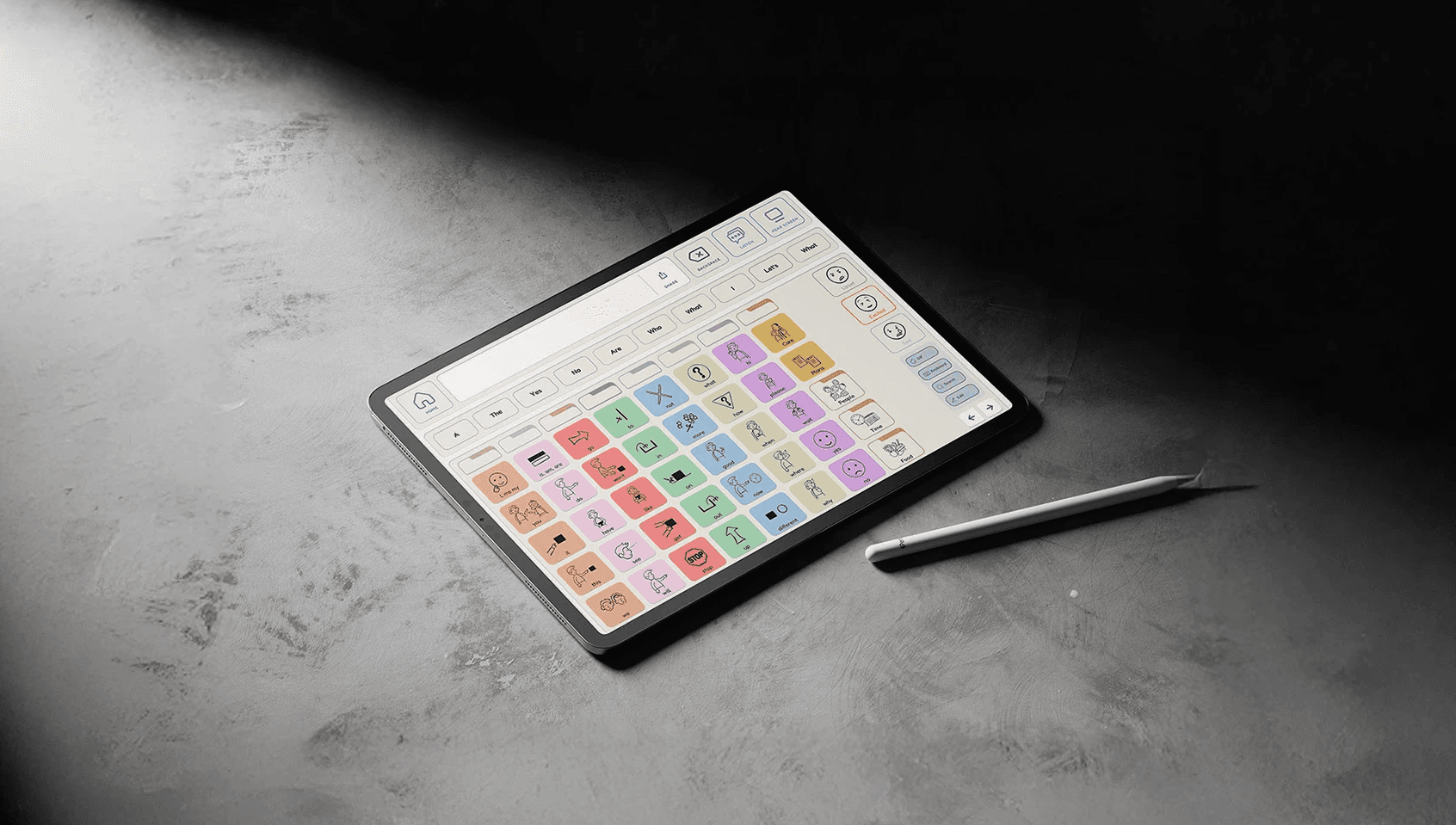
VoxAI is a concept inspired by Proloquo, an AAC (augmentative and alternative communication) app used by nonverbal individuals to communicate.

I collaborated with three other designers to design both an AI-powered app interface and a tactile device attachment that work together to make nonverbal communication faster, more expressive, and physically easier
to use.

VoxAI is a concept inspired by Proloquo, an AAC (augmentative and alternative communication) app used by nonverbal individuals to communicate.

I collaborated with three other designers to design both an AI-powered app interface and a tactile device attachment that work together to make nonverbal communication faster, more expressive, and physically easier to use.

VoxAI is a concept inspired by Proloquo, an AAC (augmentative and alternative communication) app used by nonverbal individuals to communicate.

I collaborated with three other designers to design both an AI-powered app interface and a tactile device attachment that work together to make nonverbal communication faster, more expressive, and physically easier to use.

Objective

Design a holistic AAC experience combining software and hardware.

Purpose

Enable faster, more expressive, and easier day-to-day communication for individuals with nonverbal autism.

Outcome

The AI-powered prediction system is expected to significantly reduce the effort and time needed to construct sentences.

What did I do?

UX/UI Design

Developed the user flow map and interaction logic. Refined high-fidelity prototypes for the app interface.

UX Research

Conducted secondary research on industry trends and user needs. Synthesized findings into key insights that informed design direction.

Visual System

Created VoxAI's branding, style guide, and UI components that aligned with the app's purpose and accessibility goals.

Product Design

Selected and tested materials for the physical device. Defined design principles to align with sensory and emotional goals.

PROBLEM

Many AAC tools fall short in real-life conversations.

Our team conducted 8 interviews with AAC caregivers and a speech-language pathologist while I led the secondary research. By combining interview findings with industry reports and accessibility guidelines, I uncovered four major pain points:
PAIN POINT #1

Slow Navigation

It takes users a long time to find the word or phrase they need. Navigating through multiple layers of menus feels like clicking through a maze of folders.

PAIN POINT #2

Flat Voices

Synthesized speech sounds robotic. Users want to show more personality.
PAIN POINT #3

Rigid Vocabulary

Users have to pre-program uncommon words. When something unexpected comes up, they don't have the vocabulary ready. This delays conversations.
PAIN POINT #4

Difficulty to Physically Access

AAC devices are bulky, uncomfortable, or visibly have a medical look which makes them impractical and discouraging to use in daily life.

DEFINING THE PROBLEM

How can we make day-to-day communication faster, more expressive, and easier to manage for young adults with nonverbal autism?

OUR USER

Who We Are Helping

Emma is nonverbal due to autism and relies on AAC tools to communicate. Everyday conversations can be slow and frustrating because finding words is difficult and her device doesn't express emotion.
Content

Content

Content

Engagement

Engagement

Engagement

Emma is a creative and outgoing teenager who loves fashion, TikTok, and hanging out with friends. She has limited verbal speech and relies on her AAC device daily to communicate at school, at home, and in social settings. While her device helps her stay connected, Emma often feels slowed down and restricted when trying to express herself naturally. She wants her communication tools to feel fast, intuitive, and expressive—something that matches the pace of her teenage life.

Emma is a creative and outgoing teenager who loves fashion, TikTok, and hanging out with friends. She has limited verbal speech and relies on her AAC device daily to communicate at school, at home, and in social settings. While her device helps her stay connected, Emma often feels slowed down and restricted when trying to express herself naturally. She wants her communication tools to feel fast, intuitive, and expressive—something that matches the pace of her teenage life.

Satisfaction

Satisfaction

Satisfaction

Emotional State with Proloquo

Emotional State with Proloquo

Emotional State with Proloquo

Emma struggles with slow navigation on her Proloquo app. Finding the right words often takes too long. She also finds it difficult to express emotion through her device. The synthesized speech sounds flat and robotic. Emma faces physical accessibility challenges. The iPad case is bulky and has a childish look.

Emma struggles with slow navigation on her Proloquo app. Finding the right words often takes too long. She also finds it difficult to express emotion through her device. The synthesized speech sounds flat and robotic. Emma faces physical accessibility challenges. The iPad case is bulky and has a childish look.

Emma struggles with slow navigation on her Proloquo app. Finding the right words often takes too long. She also finds it difficult to express emotion through her device. The synthesized speech sounds flat and robotic. Emma faces physical accessibility challenges. The iPad case is bulky and has a childish look.

Pain Points

Pain Points

Pain Points

Emma needs a faster way to find and say words, so she can keep up with fast-paced conversations.


She needs her AAC app to reflect her personality by allowing her to express more emotions. She also needs an easier way to add or access unexpected words in the moment without preprogramming. And finally, she needs a device that is comfortable and discreet to carry, so she doesn't feel singled out in public.

Emma needs a faster way to find and say words, so she can keep up with fast-paced conversations.


She needs her AAC app to reflect her personality by allowing her to express more emotions. She also needs an easier way to add or access unexpected words in the moment without preprogramming. And finally, she needs a device that is comfortable and discreet to carry, so she doesn't feel singled out in public.

Emma needs a faster way to find and say words, so she can keep up with fast-paced conversations.


She needs her AAC app to reflect her personality by allowing her to express more emotions. She also needs an easier way to add or access unexpected words in the moment without preprogramming. And finally, she needs a device that is comfortable and discreet to carry, so she doesn't feel singled out in public.

Emma, 17

Emma, 17

Emma, 17

Needs

Needs

Needs

High school junior

High school junior

Lives in Los Angeles

Lives in Los Angeles

PROCESS

Research & Insights

Building on the pain points we identified, we took a closer look at existing AAC tools, conducted interviews, and discovered opportunities for AI.

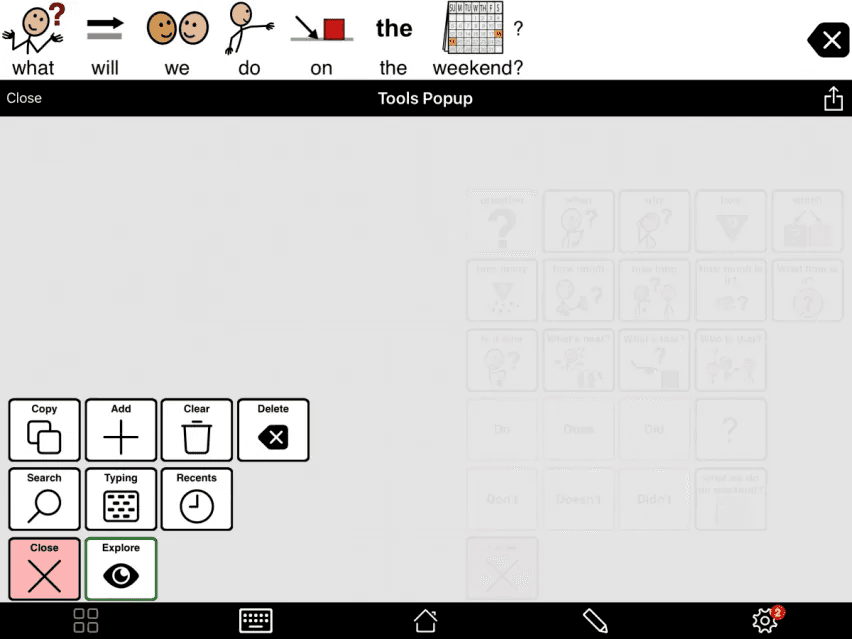
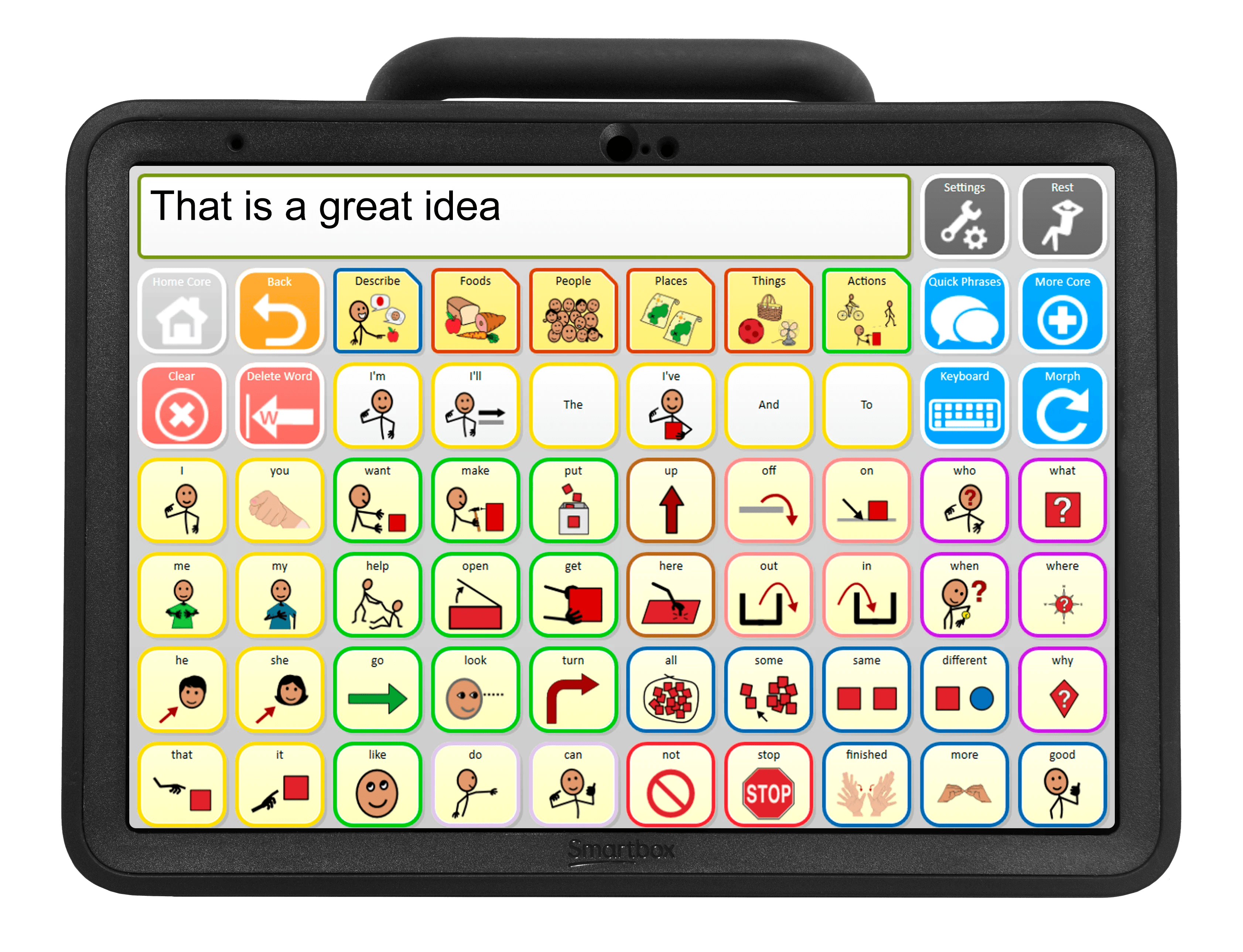
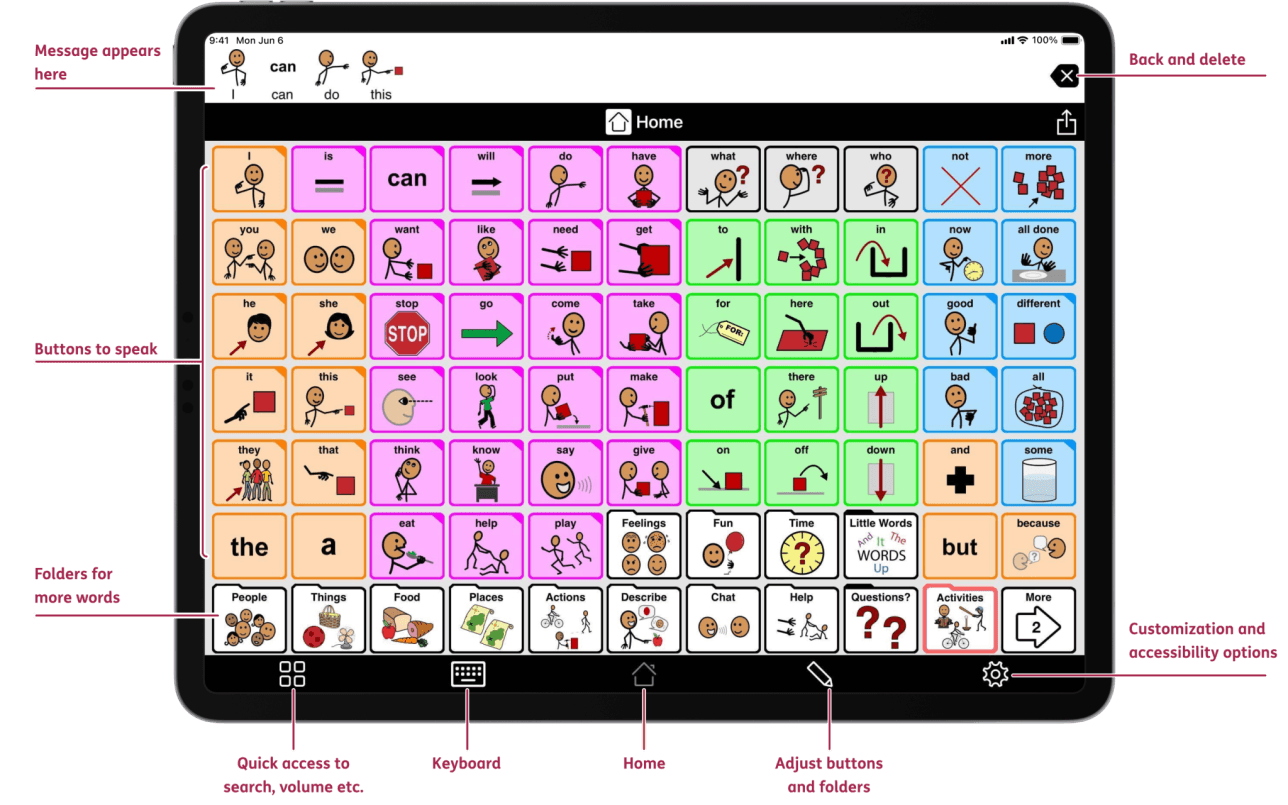
Understanding AAC Apps

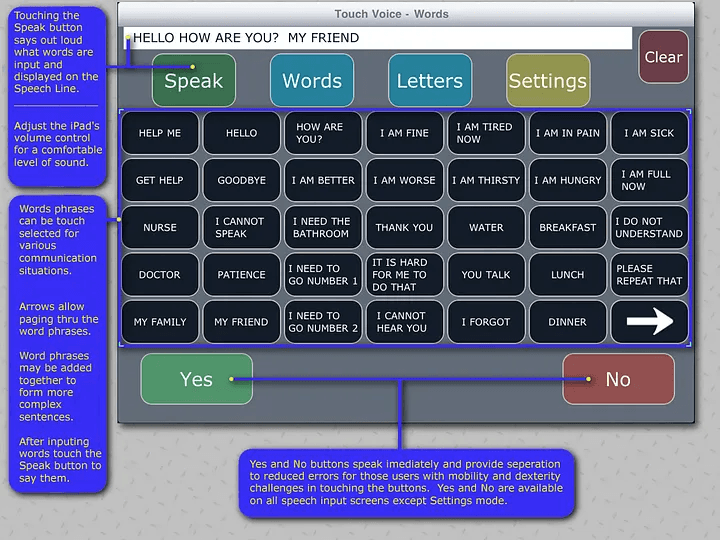
We began by exploring existing AAC apps to understand common design standards and functions.

  • These apps function as keyboards representing words instead of letters. Once a sentence is formed, the app can output it through an artificial voice.

  • Grid-based layouts make navigation easier than standard keyboard layouts.

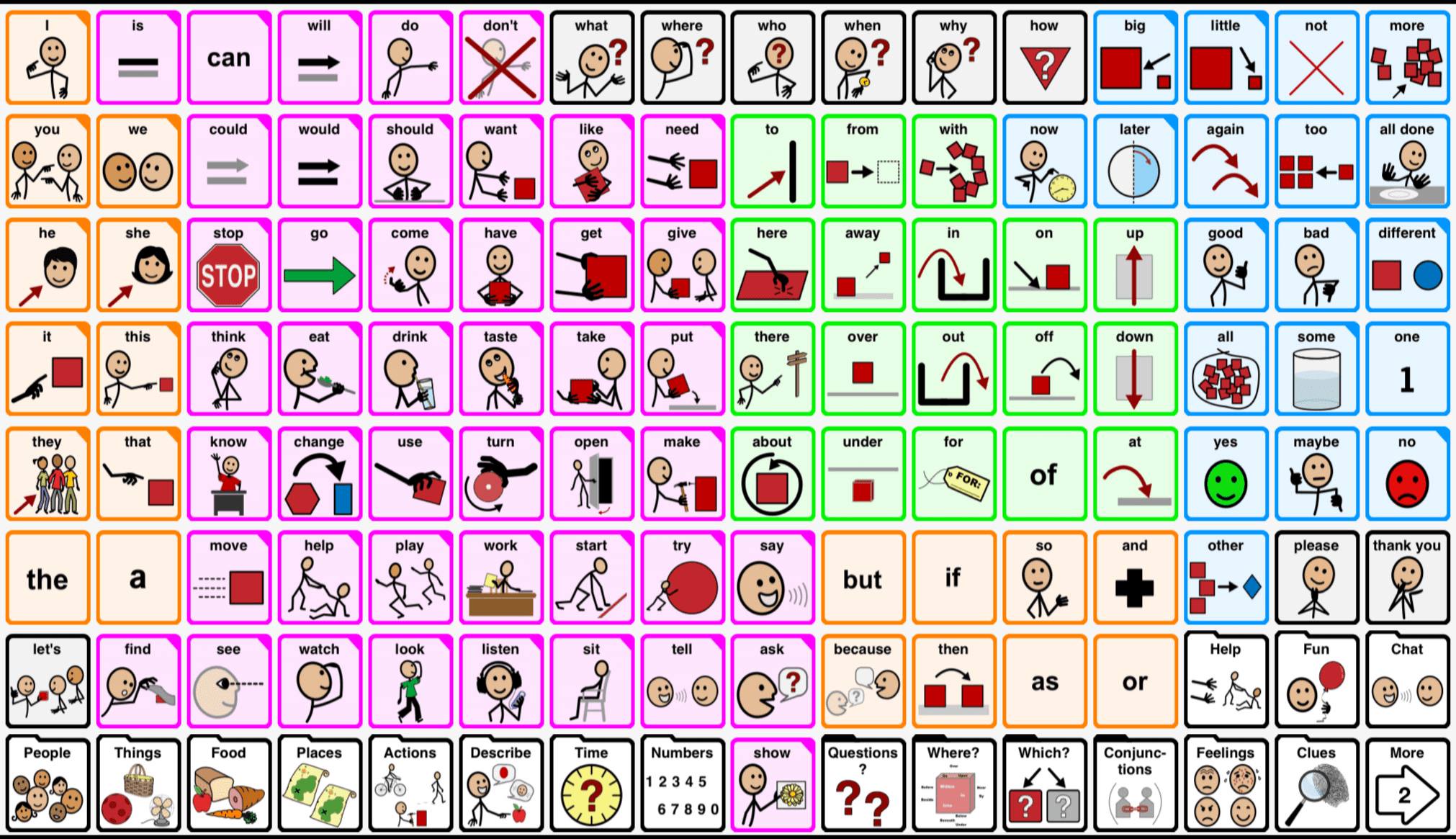
  • Systems like the Fitzgerald Key use colors to distinguish word types and aid in navigation.

  • Organizing words into categories helps with structure, but can slow navigation.

Expert Interviews

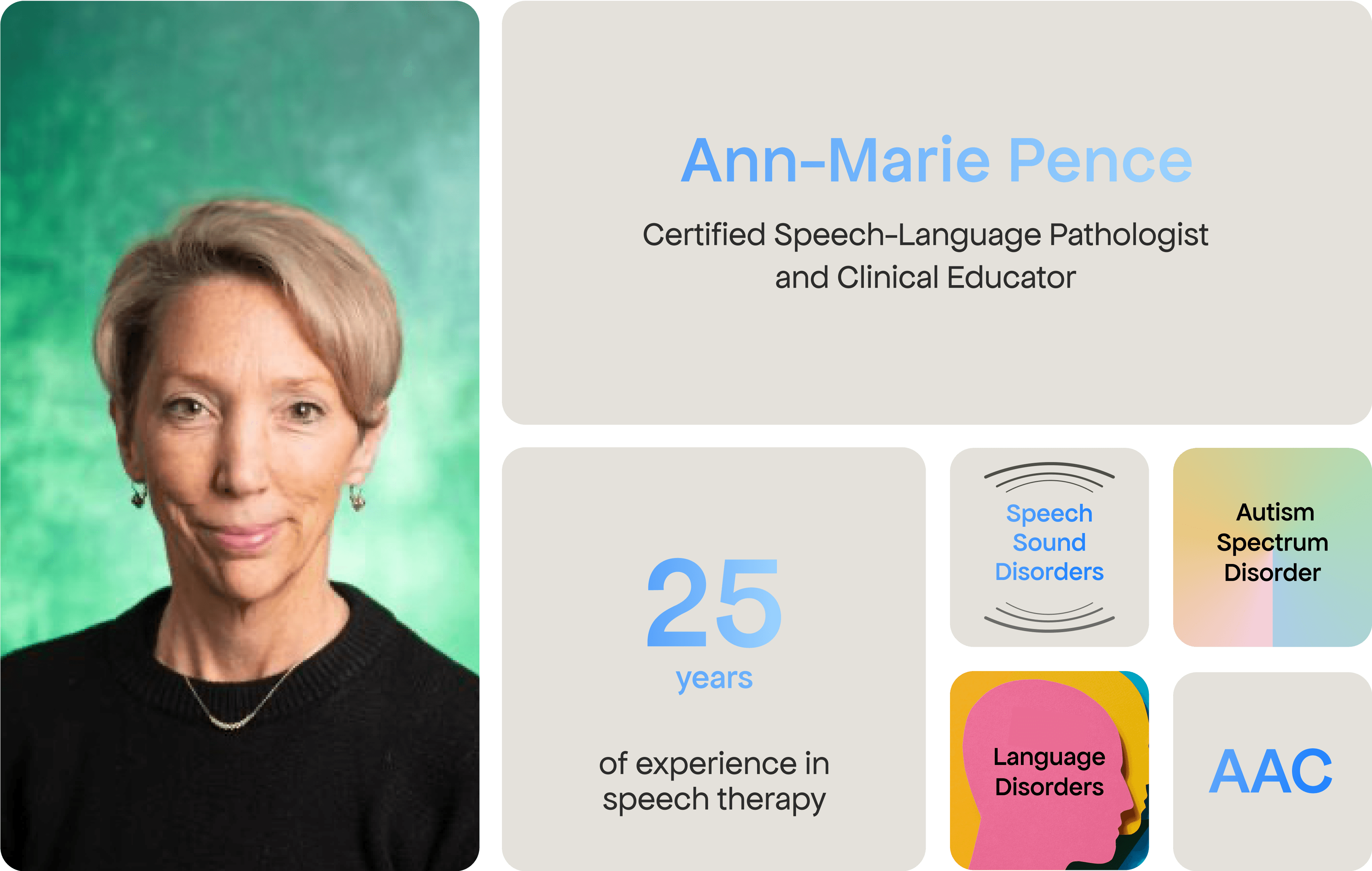
Birgess conducted four interviews with Ann-Marie, a speech-language pathologist specializing in autism. These conversations revealed that while AAC devices are essential, current tools lack adaptability.


"Many of my students rely on AAC devices every day, but the tools don’t always adapt to their individual needs."


—Ann-Marie Pence, Speech-Language Pathologist

Designing for Austism

From secondary research, I learned that designing for our user requires balancing clarity and flexibility.

  • Predictability and Navigation: Simple, structured layouts reduce cognitive load and make AAC tools easier to use.

  • Sensory Sensitivity: Muted colors prevent overstimulation while keeping the interface engaging.

  • Multiple Modes of Communication: Offering both symbols and text supports accessibility for different user preferences.

  • Flexibility and Adaptability: Customizable systems accommodate the unique needs of each user.

From secondary research, I learned that designing for our user requires balancing clarity and flexibility.

  • Predictability and Navigation: Simple, structured layouts reduce cognitive load and make AAC tools easier to use.

  • Sensory Sensitivity: Muted colors prevent overstimulation while keeping the interface engaging.

  • Multiple Modes of Communication: Offering both symbols and text supports accessibility for different user preferences.

  • Flexibility and Adaptability: Customizable systems accommodate the unique needs of each user.

Opportunities for AI

As we learned about AAC tools and their limitations, we began to imagine how AI could be implemented into our solution. These were our key insights:

  • Speed: AI predicts words and phrases which reduces the number of steps needed to form sentences.

  • Adaptability: Systems adjust to changing abilities, contexts, and user growth over time.

  • Expressiveness: AI enables users to convey tone in their audio output for nuanced communication.

From secondary research, I learned that designing for our user requires balancing clarity and flexibility.

  • Predictability and Navigation: Simple, structured layouts reduce cognitive load and make AAC tools easier to use.

  • Sensory Sensitivity: Muted colors prevent overstimulation while keeping the interface engaging.

  • Multiple Modes of Communication: Offering both symbols and text supports accessibility for different user preferences.

  • Flexibility and Adaptability: Customizable systems accommodate the unique needs of each user.

SOLUTION

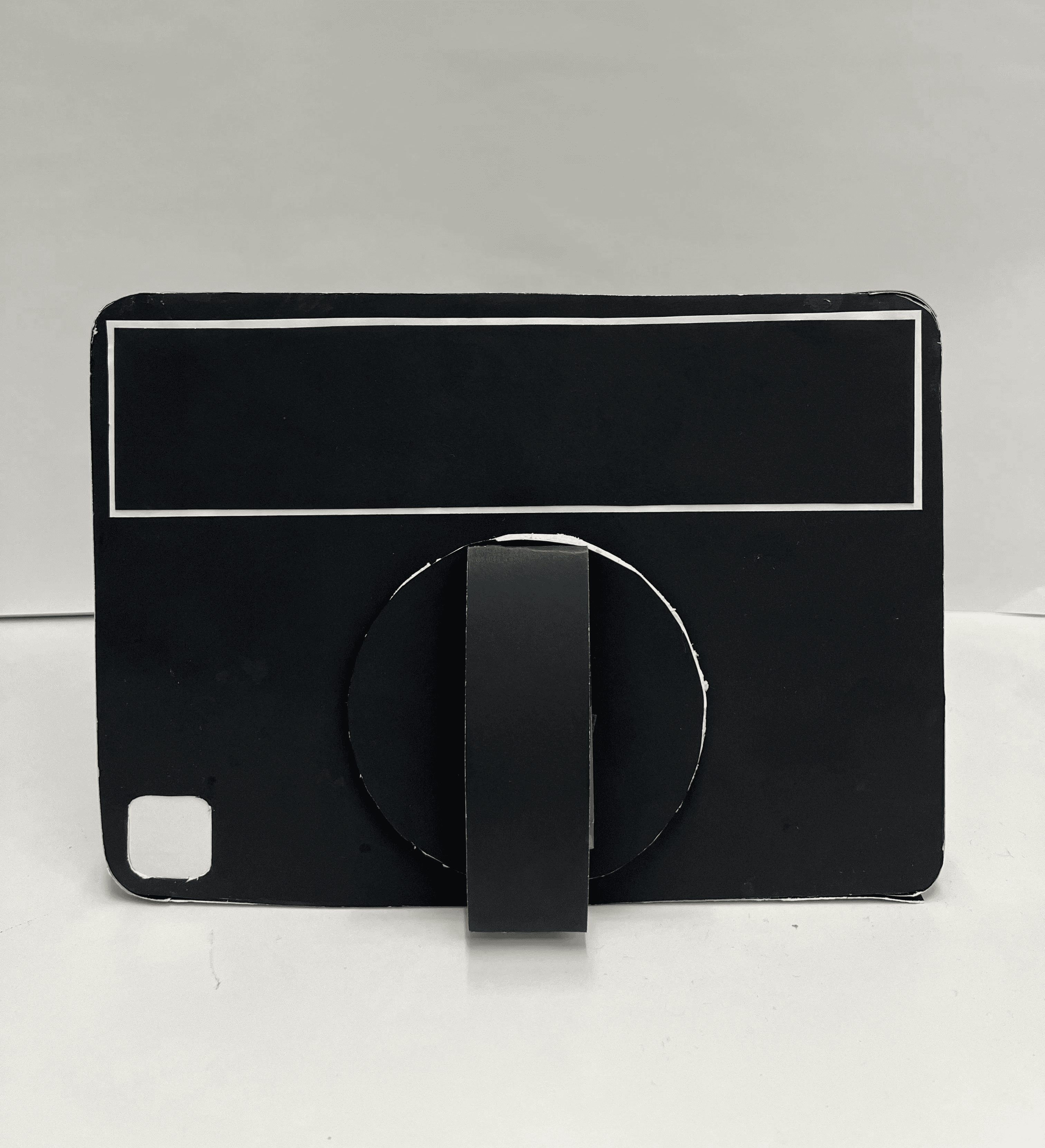
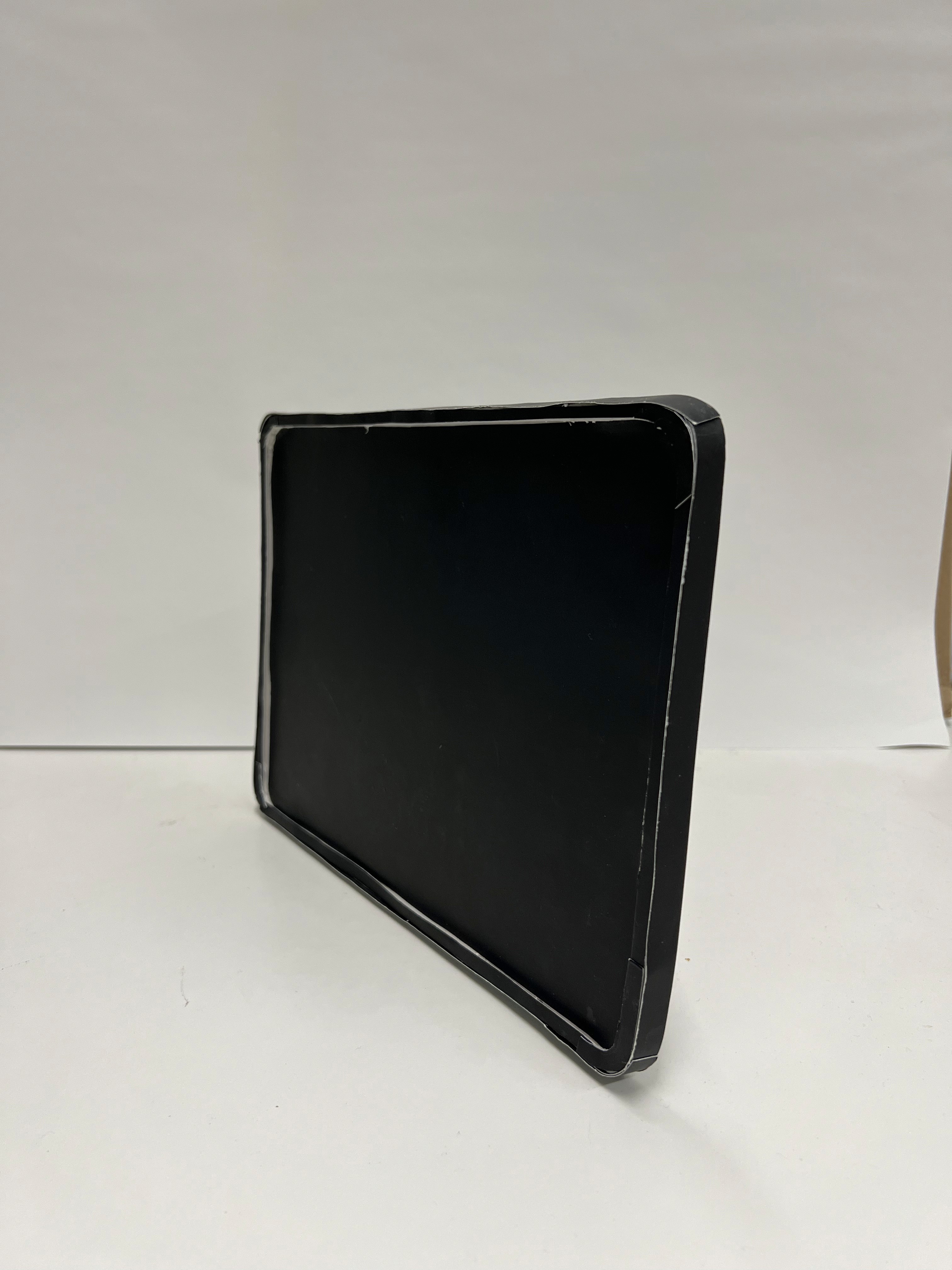
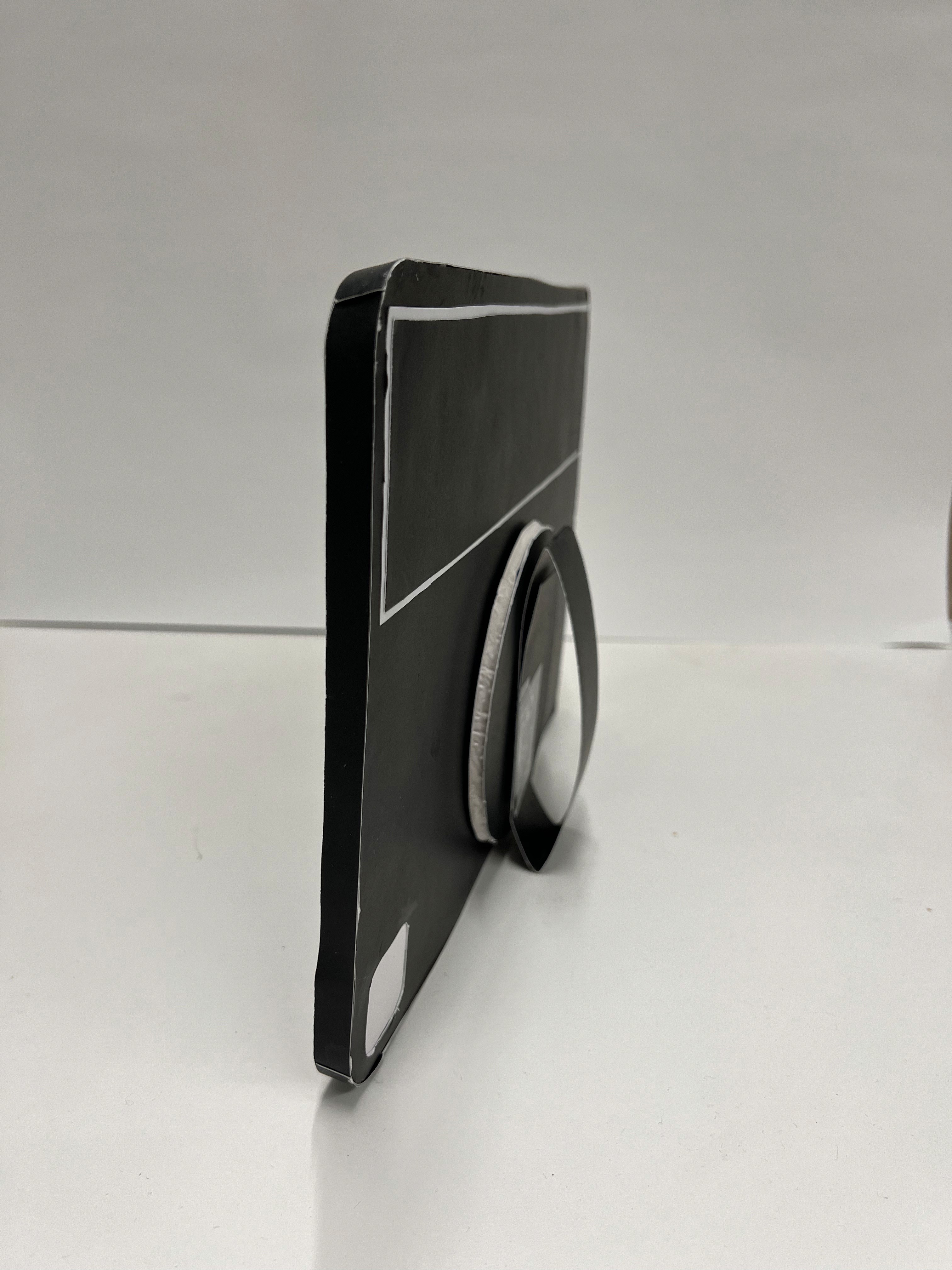
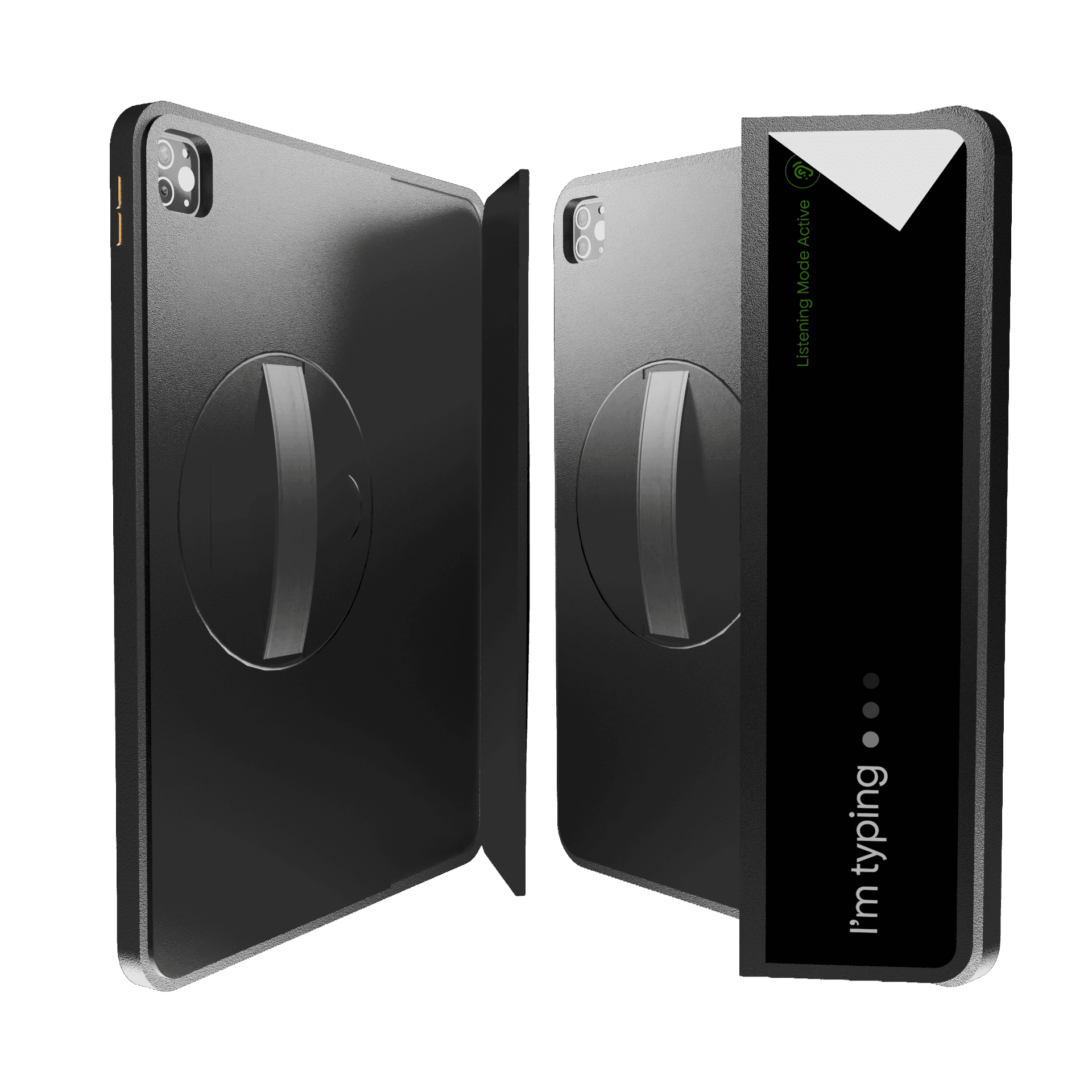
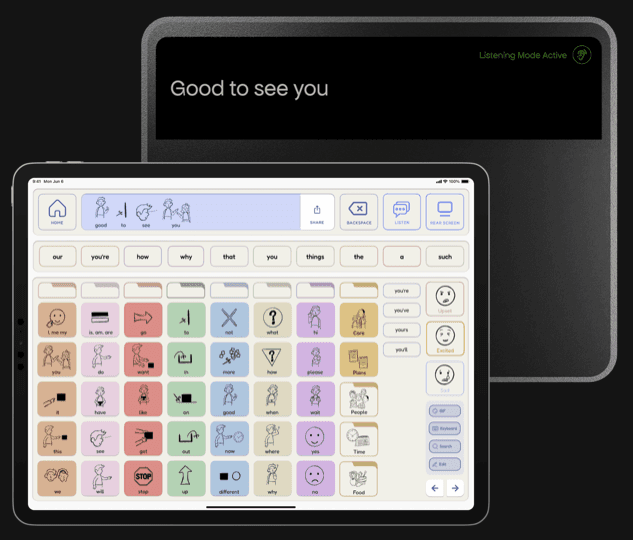
VoxAI is a hybrid AAC solution combining a physical handheld case with a digital interface.

It's designed to make communication faster, easier, and expressive for individuals with nonverbal autism.
PHYSICAL OBJECT

The Case

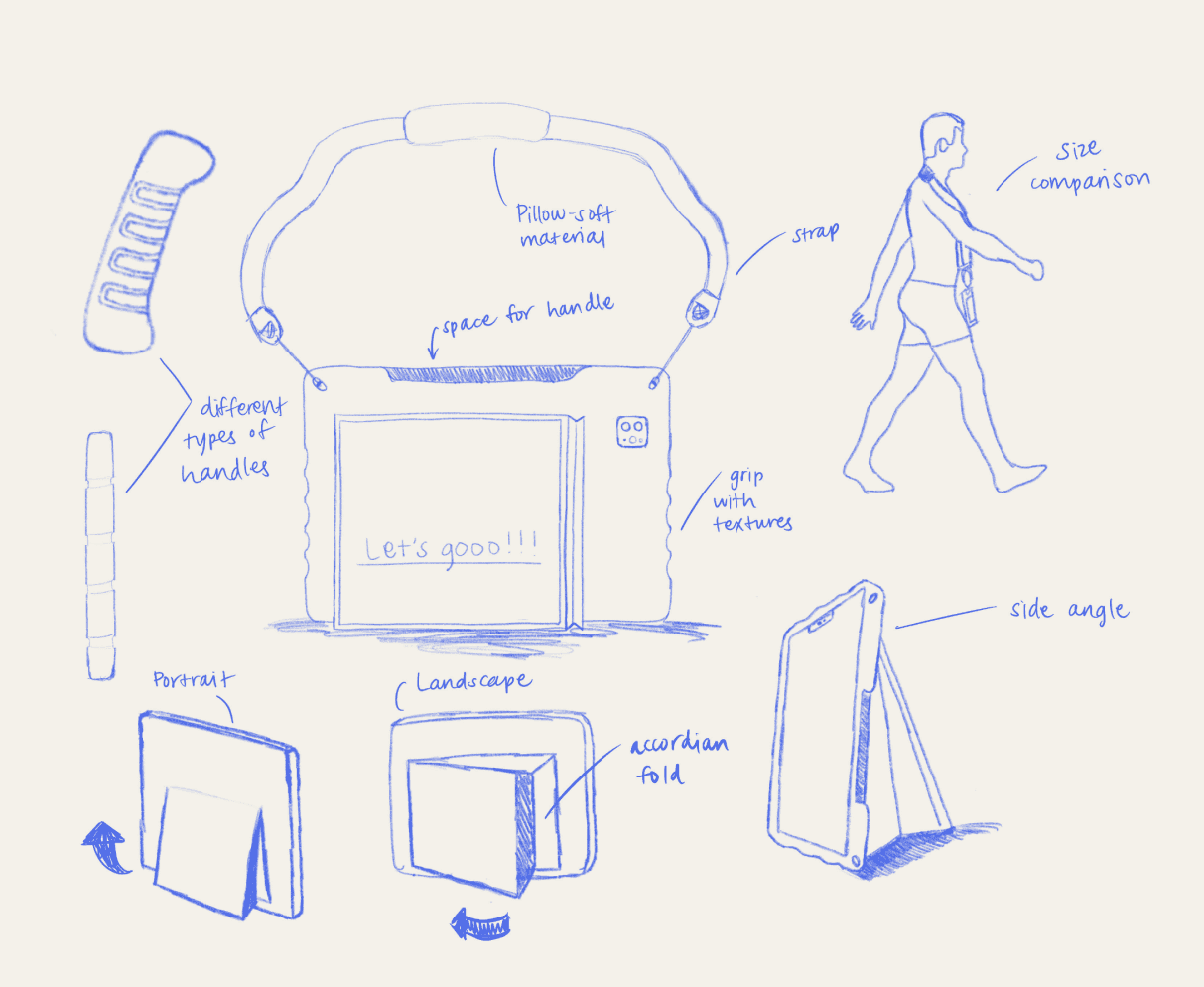
Early Concept

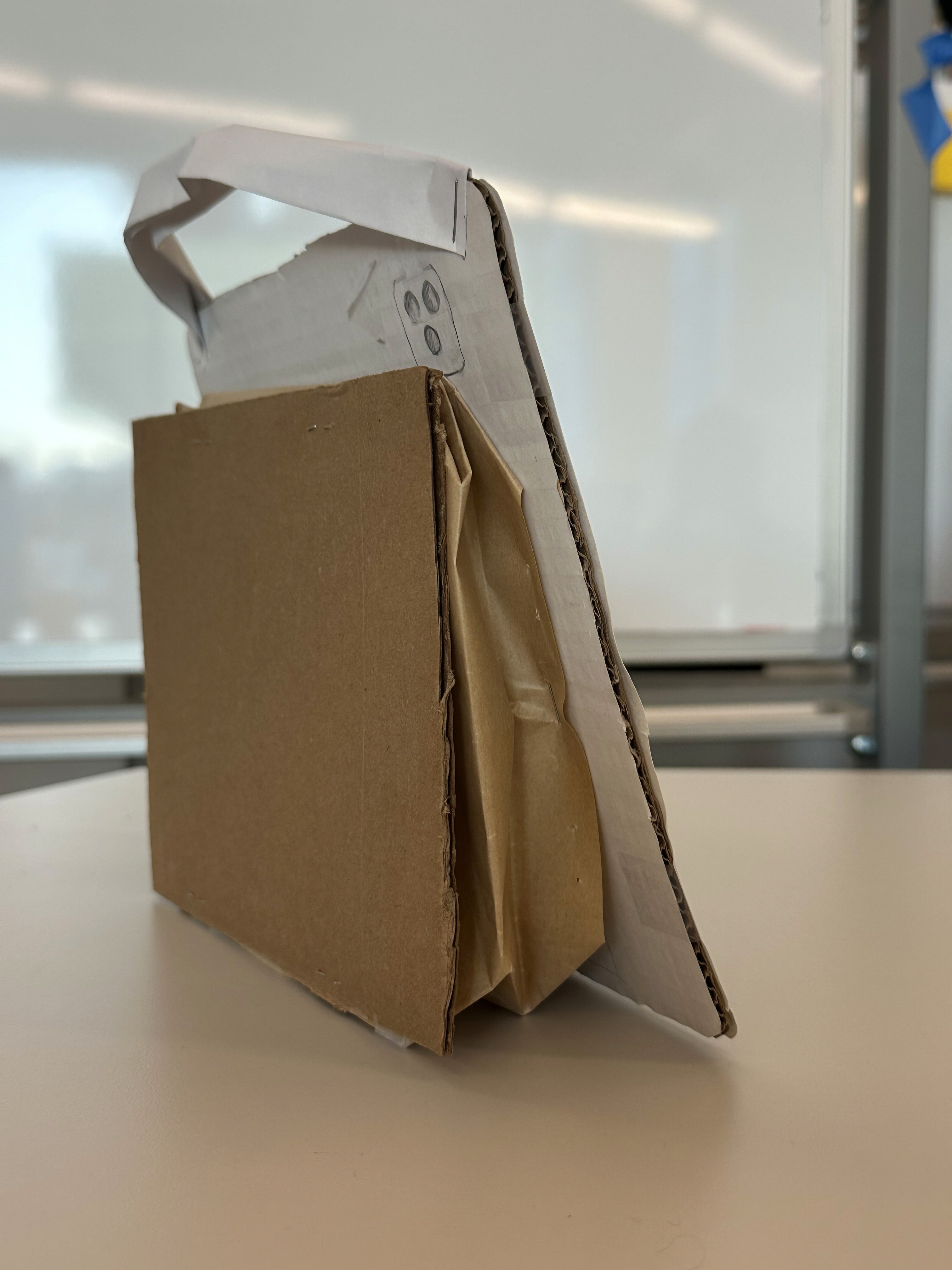
Our early prototypes included a strap, textured side grips, and a foldable stand. The goal was to make the device easier to hold and use across different orientations. However, user feedback and testing revealed issues: the strap and textures could feel overstimulating, while the stand only supported landscape mode.

PROCESS

Research & Insights

Building on the pain points we identified, we took a closer look at existing AAC tools, conducted interviews, and discovered opportunities for AI.

Reframing Based on Feedback

Understanding AAC Apps

After removing the foldable stand, we found an opportunity to integrate a rear screen—a higher priority feature that directly addressed communication challenges for our users. This shift allowed us to pivot from "extra hardware conveniences" toward features that supported real, unmet needs.

We began by exploring existing AAC apps to understand common design standards and functions.

  • These apps function as keyboards representing words instead of letters. Once a sentence is formed, the app can output it through an artificial voice.

  • Grid-based layouts make navigation easier than standard keyboard layouts.

  • Systems like the Fitzgerald Key use colors to distinguish word types and aid in navigation.

  • Organizing words into categories helps with structure, but can slow navigation.

Final Design

Expert Interviews

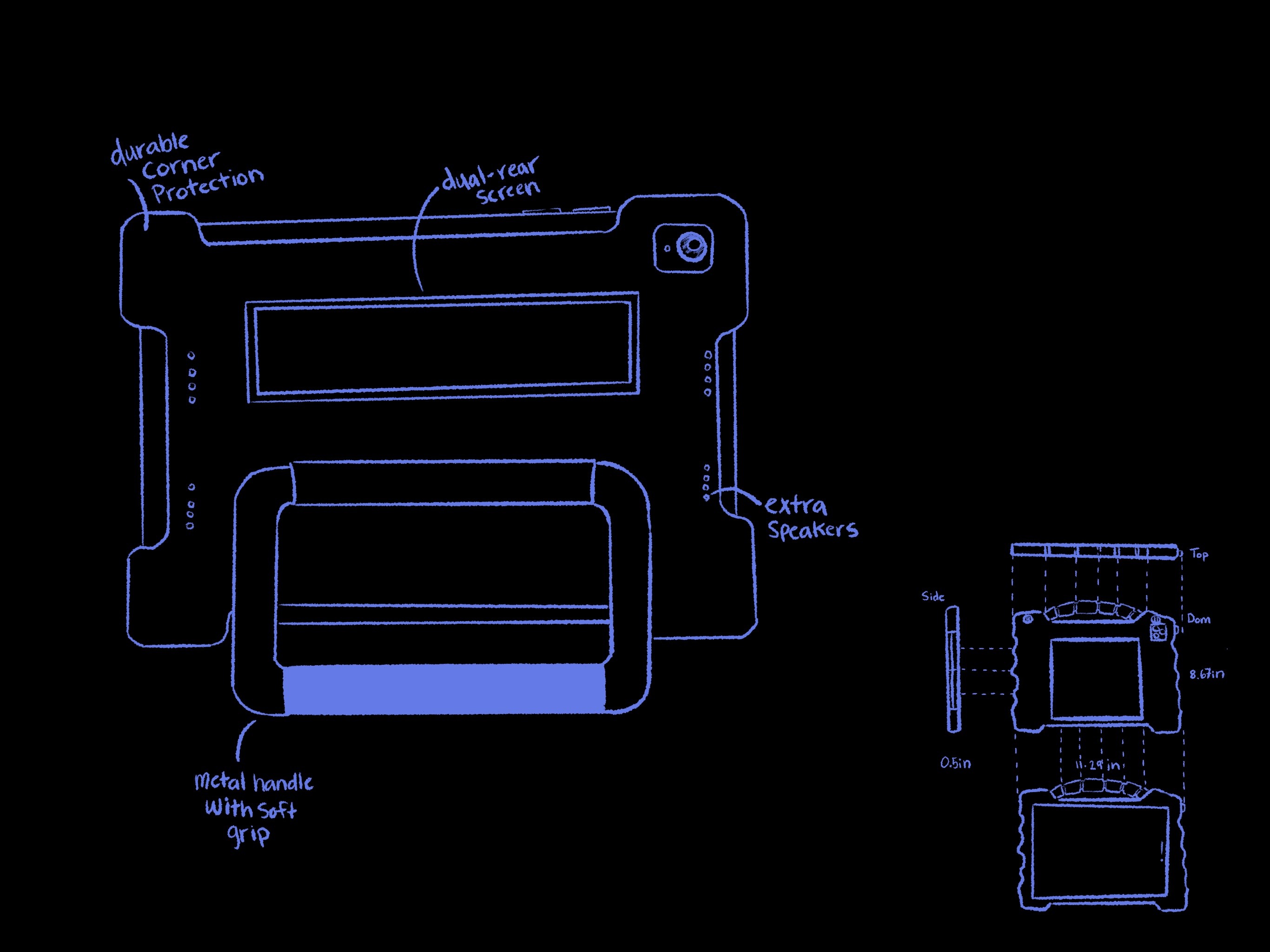
We landed on a design where simplicity and functionality were important in meeting our users' needs. This approach resulted in a sleek, lightweight case that is optimized for handheld comfort.

Birgess conducted four interviews with Ann-Marie, a speech-language pathologist specializing in autism. These conversations revealed that while AAC devices are essential, current tools lack adaptability.


"Many of my students rely on AAC devices every day, but the tools don’t always adapt to their individual needs."


—Ann-Marie Pence, Speech-Language Pathologist

KEY FEATURES

Rotating Handle

  • Solves portability and holding challenges without overstimulation from straps or textures.

  • Supports multiple orientations and gives users flexibility in different contexts.

  • Works seamlessly with the rear screen placement.

Rear Screen Integration

  • Provides real-time visual feedback of spoken sentences to improve flow and inclusivity.

  • Displays communication in progress so conversational partners don't disengage too early.

VoxAI is a concept inspired by Proloquo, an AAC (augmentative and alternative communication) app used by nonverbal individuals to communicate.

I collaborated with three other designers to design both an AI-powered app interface and a tactile device attachment that work together to make nonverbal communication faster, more expressive, and physically easier to use.

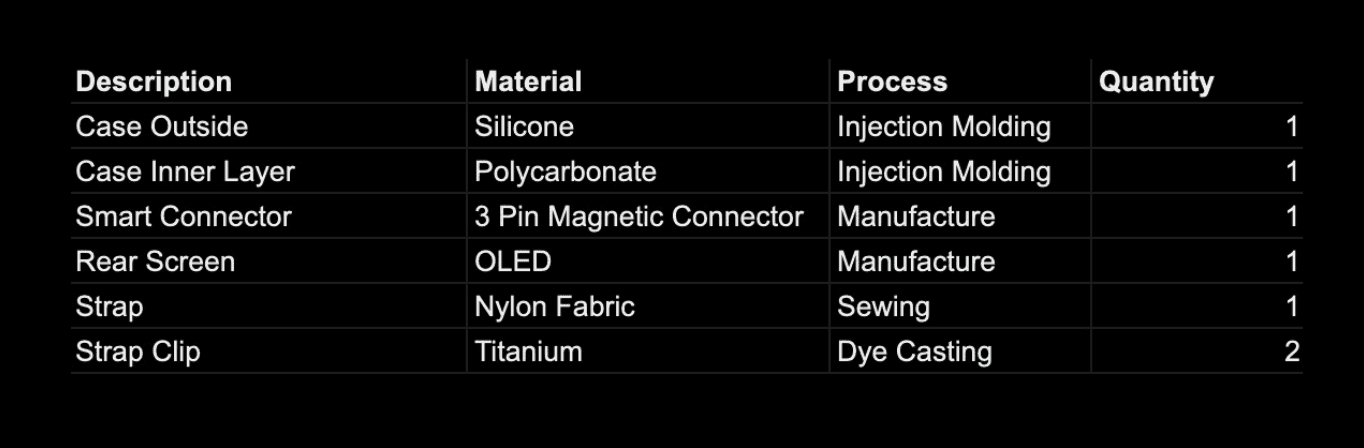
Bill of Materials

Designing for Autism

To evaluate the feasibility of producing the VoxAI case, we broke down the components and materials required for manufacturing. This breakdown confirmed that the case can be produced with existing manufacturing methods.

From secondary research, I learned that designing for our user requires balancing clarity and flexibility.

  • Predictability and Navigation: Simple, structured layouts reduce cognitive load and make AAC tools easier to use.

  • Sensory Sensitivity: Muted colors prevent overstimulation while keeping the interface engaging.

  • Multiple Modes of Communication: Offering both symbols and text supports accessibility for different user preferences.

  • Flexibility and Adaptability: Customizable systems accommodate the unique needs of each user.

Opportunities for AI

As we learned about AAC tools and their limitations, we began to imagine how AI could be implemented into our solution. These were our key insights:

  • Speed: AI predicts words and phrases which reduces the number of steps needed to form sentences.

  • Adaptability: Systems adjust to changing abilities, contexts, and user growth over time.

  • Expressiveness: AI enables users to convey tone in their audio output for nuanced communication.

PHYSICAL OBJECT

The Case

Early Concept

Our early prototypes included a strap, textured side grips, and a foldable stand. The goal was to make the device easier to hold and use across different orientations. However, user feedback and testing revealed issues: the strap and textures could feel overstimulating, while the stand only supported landscape mode.

Reframing Based on Feedback

After removing the foldable stand, we found an opportunity to integrate a rear screen—a higher priority feature that directly addressed communication challenges for our users. This shift allowed us to pivot from "extra hardware conveniences" toward features that supported real, unmet needs.

Final Design

We landed on a design where simplicity and functionality were important in meeting our users' needs. This approach resulted in a sleek, lightweight case that is optimized for handheld comfort.

KEY FEATURES

Rotating Handle

  • Solves portability and holding challenges without overstimulation from straps or textures.

  • Supports multiple orientations and gives users flexibility in different contexts.

  • Works seamlessly with the rear screen placement.

Rear Screen Integration

VoxAI is a concept inspired by Proloquo, an AAC (augmentative and alternative communication) app used by nonverbal individuals to communicate.

I collaborated with three other designers to design both an AI-powered app interface and a tactile device attachment that work together to make nonverbal communication faster, more expressive, and physically easier to use.

Bill of Materials

To evaluate the feasibility of producing the VoxAI case, we broke down the components and materials required for manufacturing. This breakdown confirmed that the case can be produced with existing manufacturing methods.

DIGITAL INTERFACE

The App

Early Concept
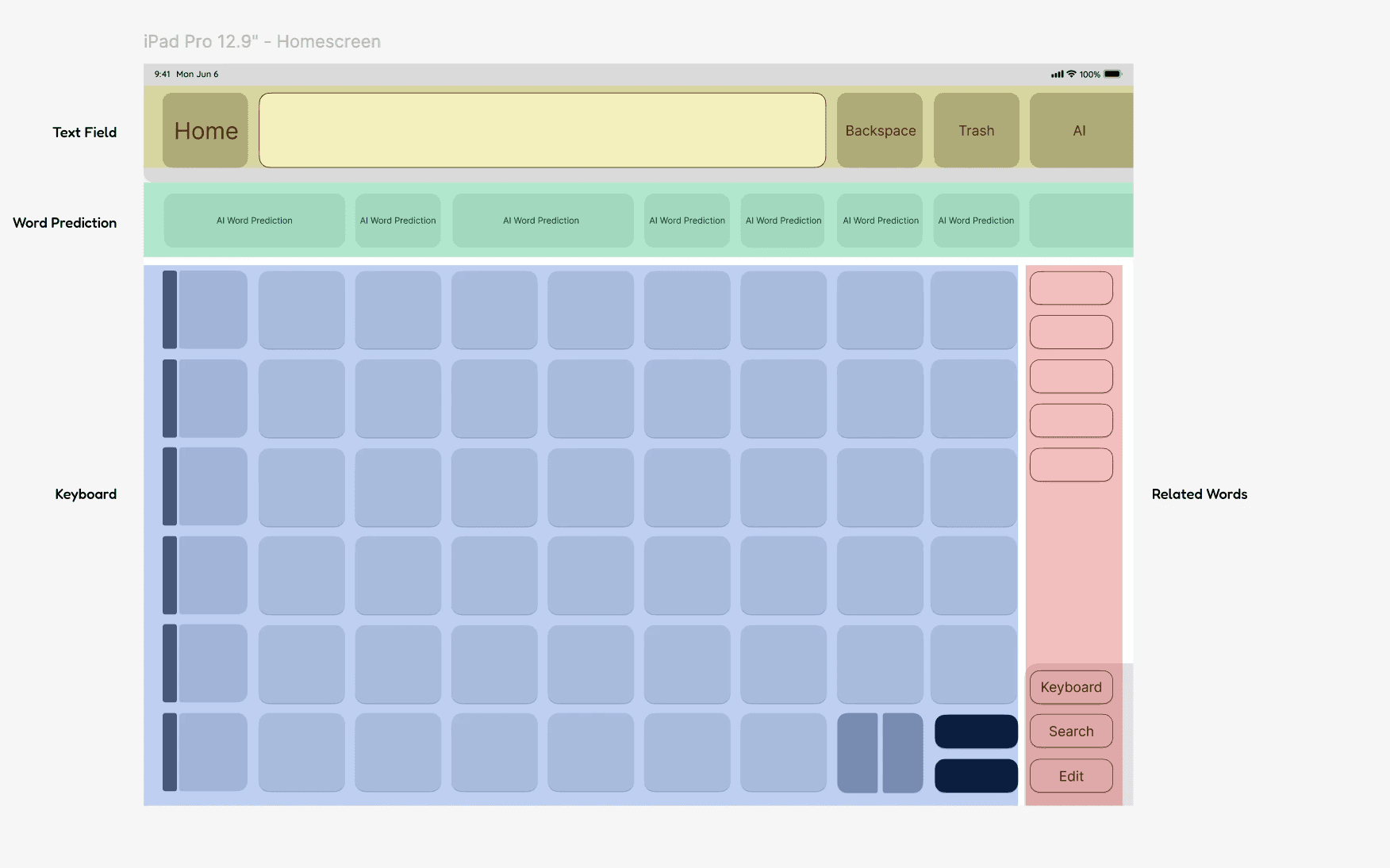
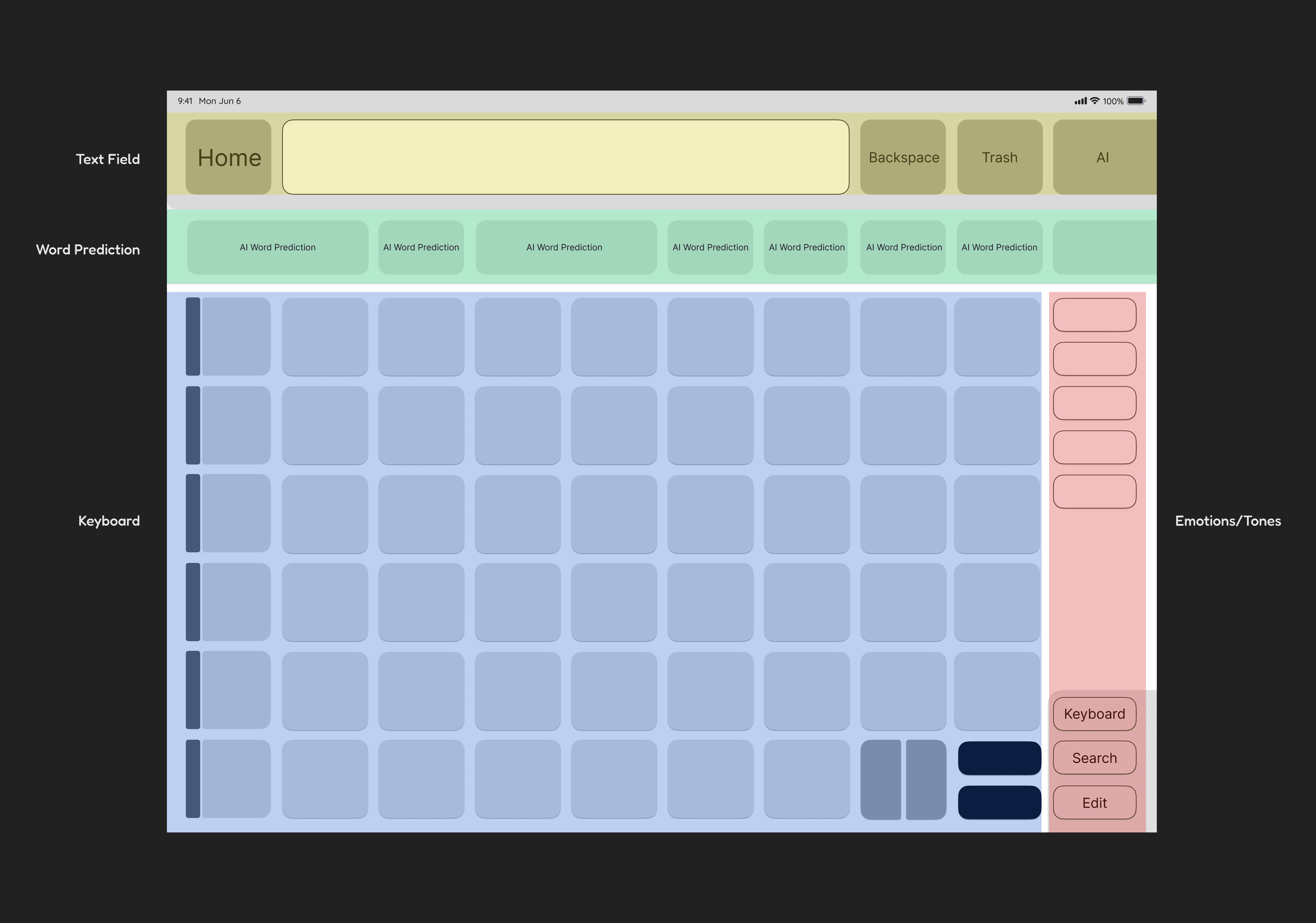
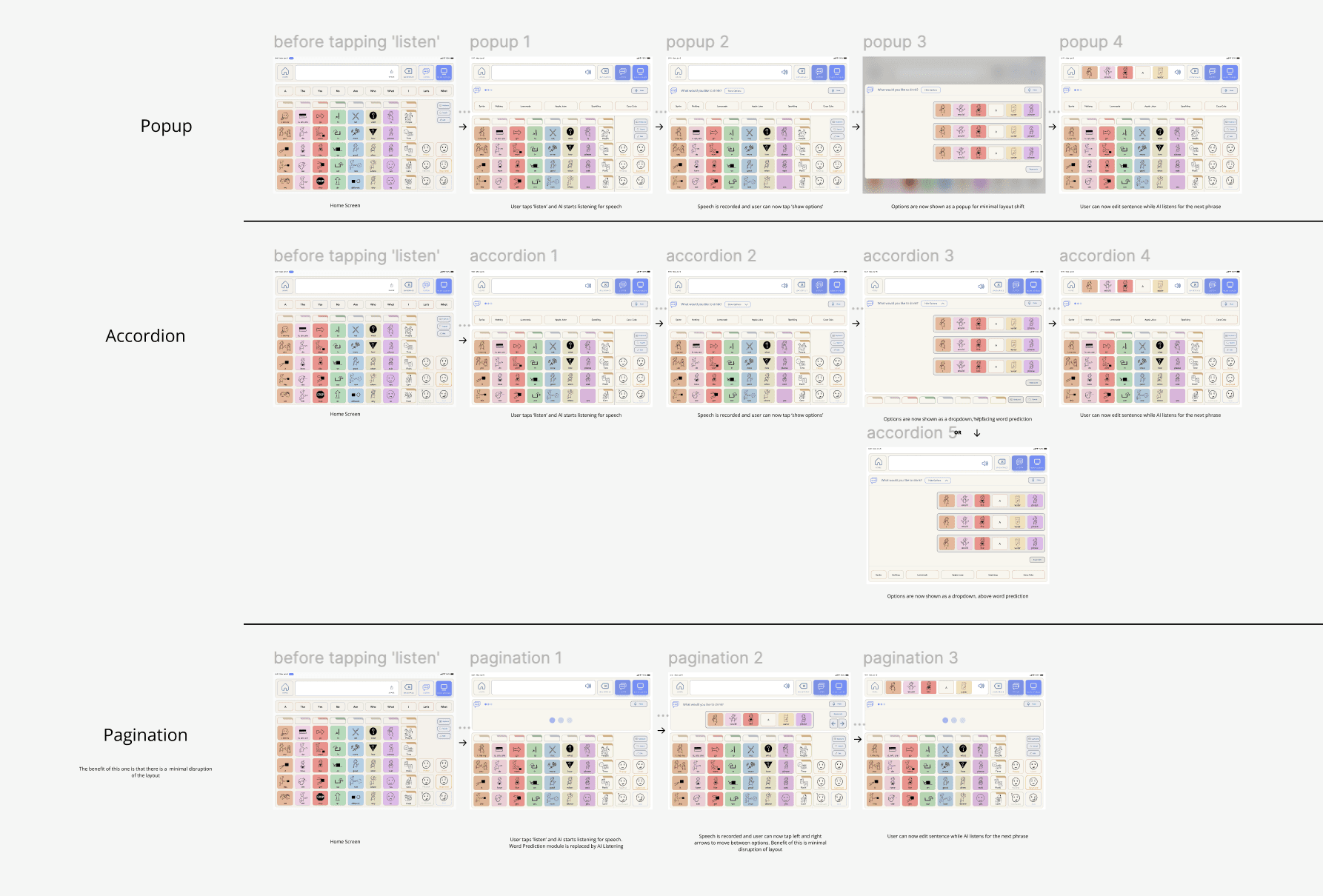
A first look at our early wireframes, mid-fidelity screens, and initial drafts. These designs went through dozens of iterations as the project evolved. The UI design was envisioned as an AI-enhanced AAC app that was inspired by the familiar structure of Proloquo.

We grounded the interface in grid-based navigation and color-coded word types (Fitzgerald Key) to minimize frustration and build on what users already know. Early explorations centered around these features:

  • AI-generated word prediction informed by user habits and geolocation.

  • AI-generated images for custom buttons to make communication more personalized.

  • Conversation recording which could suggest entire phrases for the user to respond with.

A first look at our early wireframes, mid-fidelity screens, and initial drafts. These designs went through dozens of iterations as the project evolved. The UI design was envisioned as an AI-enhanced AAC app that was inspired by the familiar structure of Proloquo.

We grounded the interface in grid-based navigation and color-coded word types (Fitzgerald Key) to minimize frustration and build on what users already know. Early explorations centered around these features:

  • AI-generated word prediction informed by user habits and geolocation.

  • AI-generated images for custom buttons to make communication more personalized.

  • Conversation recording which could suggest entire phrases for the user to respond with.

A first look at our early wireframes, mid-fidelity screens, and initial drafts. These designs went through dozens of iterations as the project evolved. The UI design was envisioned as an AI-enhanced AAC app that was inspired by the familiar structure of Proloquo.

We grounded the interface in grid-based navigation and color-coded word types (Fitzgerald Key) to minimize frustration and build on what users already know. Early explorations centered around these features:

  • AI-generated word prediction informed by user habits and geolocation.

  • AI-generated images for custom buttons to make communication more personalized.

  • Conversation recording which could suggest entire phrases for the user to respond with.

User Flow

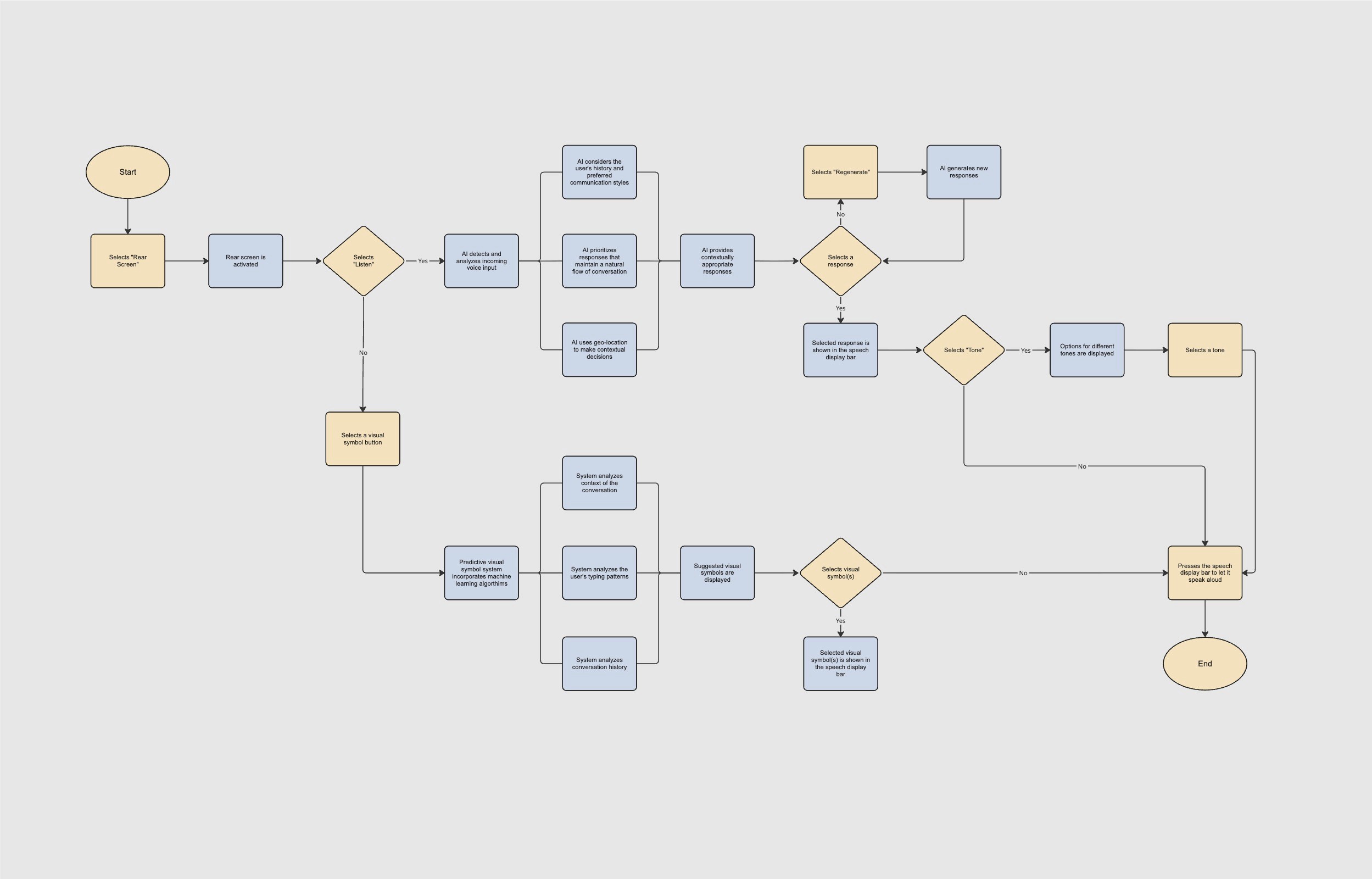
A familiar user flow for young adults with non-verbal autism was crucial, as they can struggle with navigating complex apps. Since AAC apps typically share similar structures, users were already comfortable with these interface patterns.
Journey Map

We created a journey map to visualize and anticipate user interactions. This map serves as a blueprint for refining the app's user experience. By empathetically mapping the user journey, we ensured that VoxAI not only meets functional requirements, but also resonates with the emotional and usability needs.

Reframing Based on Feedback
As our designs matured, we conducted a heuristic evaluation using Nielsen's 10 usability heuristics and gathered feedback from peers and users. These reviews revealed opportunities to simplify the experience and better align the app with core user needs. These were the key adjustments:

  • Removed Customization: AI-generated imagery for custom buttons felt convenient, but it didn't directly address any of our users' core pain points. We eliminated this feature to keep the focus on meaningful communication.

  • Added Emotional Tones: One of the most consistent pain points we heard was the inability to express emotion through AAC. Our original concept overlooked this need, so we introduced tone control for voice output to give users more expressive freedom. Based on user feedback, we narrowed it down to three tones to simplify the experience.

  • Strengthened System Feedback: Heuristic evaluation showed that conversations could feel ambiguous without clear signals. We added real-time visual feedback to show when the app was recording or generating responses to keep both users and conversation partners aligned.

As our designs matured, we conducted a heuristic evaluation using Nielsen's 10 usability heuristics and gathered feedback from peers and users. These reviews revealed opportunities to simplify the experience and better align the app with core user needs. These were the key adjustments:

  • Removed Customization: AI-generated imagery for custom buttons felt convenient, but it didn't directly address any of our users' core pain points. We eliminated this feature to keep the focus on meaningful communication.

  • Added Emotional Tones: One of the most consistent pain points we heard was the inability to express emotion through AAC. Our original concept overlooked this need, so we introduced tone control for voice output to give users more expressive freedom. Based on user feedback, we narrowed it down to three tones to simplify the experience.

  • Strengthened System Feedback: Heuristic evaluation showed that conversations could feel ambiguous without clear signals. We added real-time visual feedback to show when the app was recording or generating responses to keep both users and conversation partners aligned.

As our designs matured, we conducted a heuristic evaluation using Nielsen's 10 usability heuristics and gathered feedback from peers and users. These reviews revealed opportunities to simplify the experience and better align the app with core user needs. These were the key adjustments:


  • Removed Customization: AI-generated imagery for custom buttons felt convenient, but it didn't directly address any of our users' core pain points. We eliminated this feature to keep the focus on meaningful communication.

  • Added Emotional Tones: One of the most consistent pain points we heard was the inability to express emotion through AAC. Our original concept overlooked this need, so we introduced tone control for voice output to give users more expressive freedom. Based on user feedback, we narrowed it down to three tones to simplify the experience.

  • Strengthened System Feedback: Heuristic evaluation showed that conversations could feel ambiguous without clear signals. We added real-time visual feedback to show when the app was recording or generating responses to keep both users and conversation partners aligned.

Final Design

The final design addressed three core user needs: typing support, conversation support, and expression support.

KEY FEATURES

AI-Powered Word Prediction

  • Adaptive suggestions anticipate what the user wants to say based on context, past usage, and location.

  • Reduces typing effort and increased efficiency.

INTERACTION FLOW

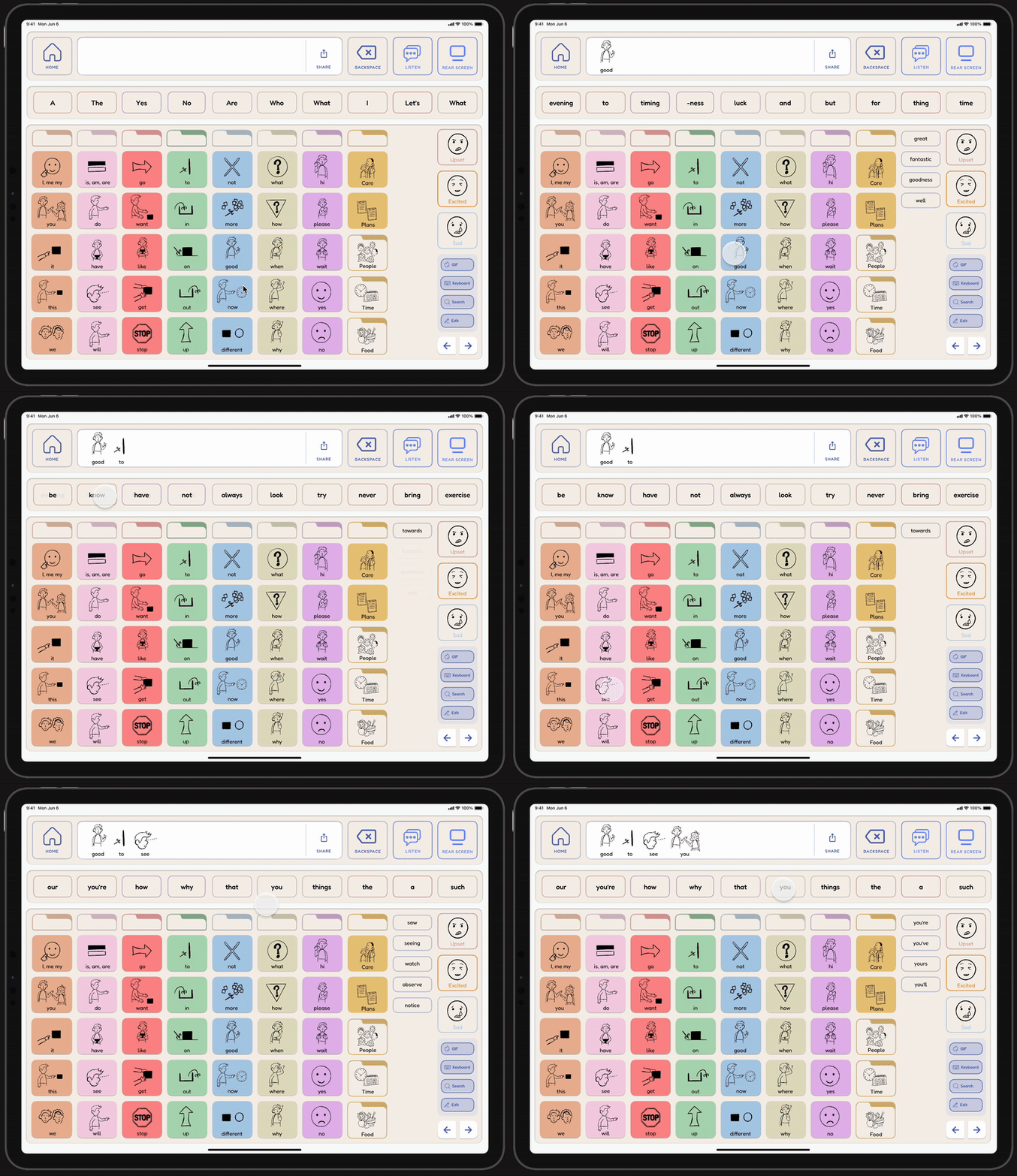
While composing a message, the user sees an adaptive prediction bar that updates with relevant word options.
Smart-Phrase Assist

  • Uses live conversation audio to recommend entire response options.

  • Visual cues on the rear screen let conversation partners know that the system is recording.

INTERACTION FLOW

In live conversations, the user can toggle on recording to get three phrase suggestions. The user can edit or regenerate them before sending.

Adjustable Voice Tone

  • Users can adjust the vocal output to convey emotion.

  • Addresses common pain points of expressive limitations in AAC tools.

INTERACTION FLOW

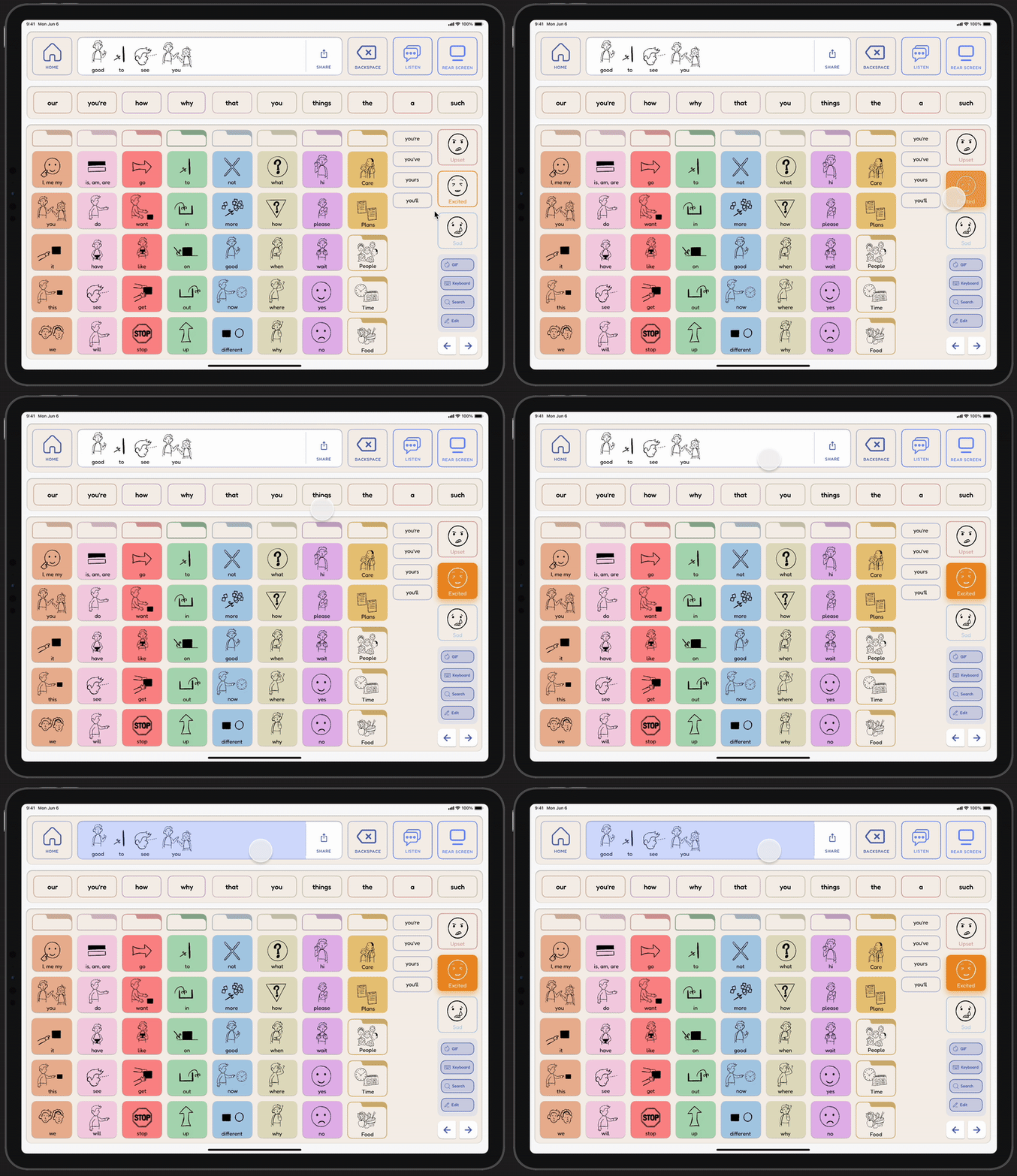
Once a message is ready, the user selects a tone before the app vocalizes it.
DESIGN SYSTEM

Designing with the sensory needs of non-verbal autistic users in mind.

We looked into established guidelines for designing for autistic users to develop a system that supports communication without causing sensory overload or confusion. Building on this research, we also leveraged the UX principle of The Law of Repetition to promote consistency and predictability.


Our goal was to create an interface that feels familiar, yet simplified and faster to navigate for users.

KEY ELEMENTS

Colors

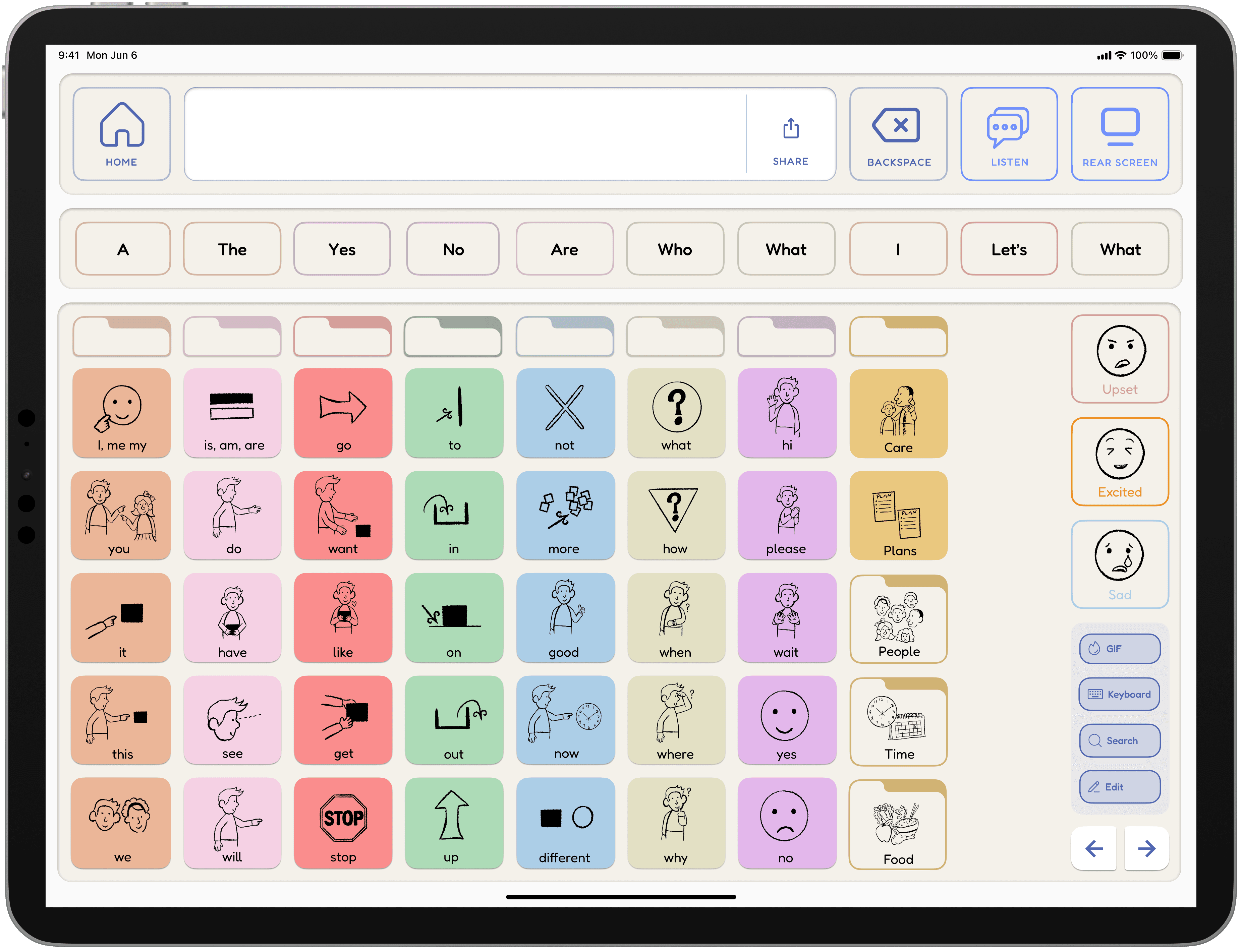
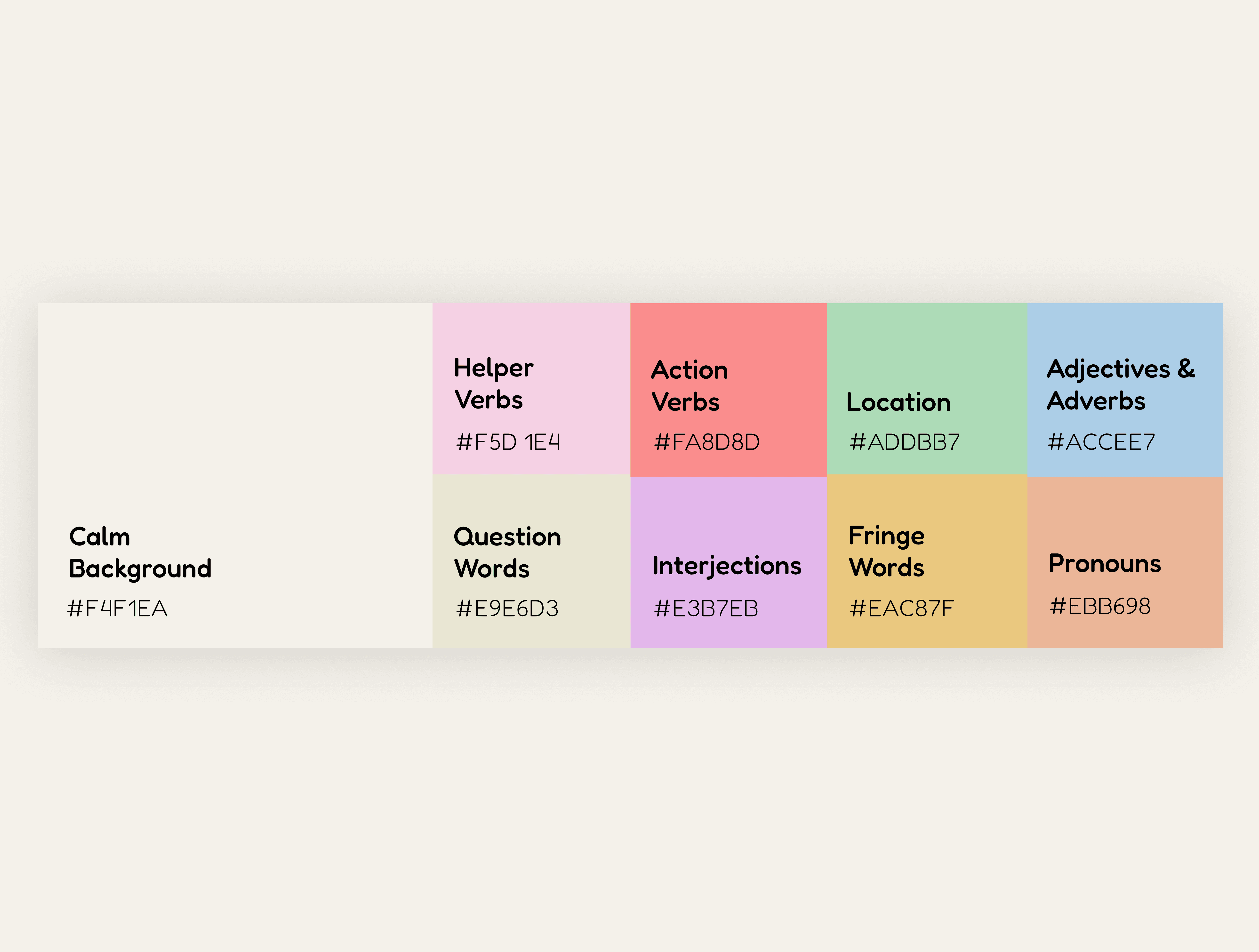
Based on the Fitzgerald system, colors help users recognize word types. While existing apps use brighter colors, we chose muted tones for a calmer experience.
Typography

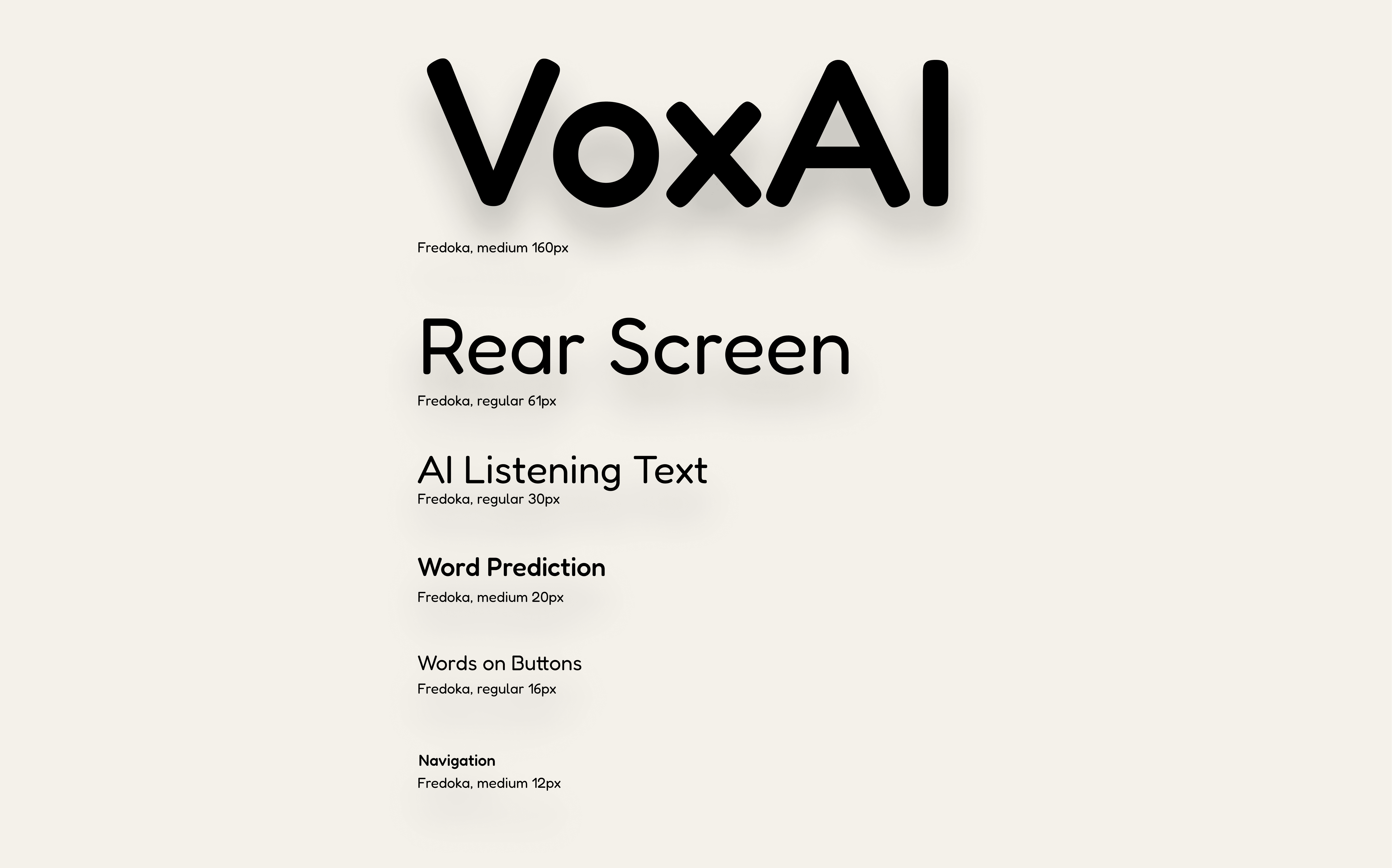
We selected Fredoka for its friendly, handwritten style. Research indicates this font style is preferred by individuals with autism for easier reading. spacing issue____
Buttons

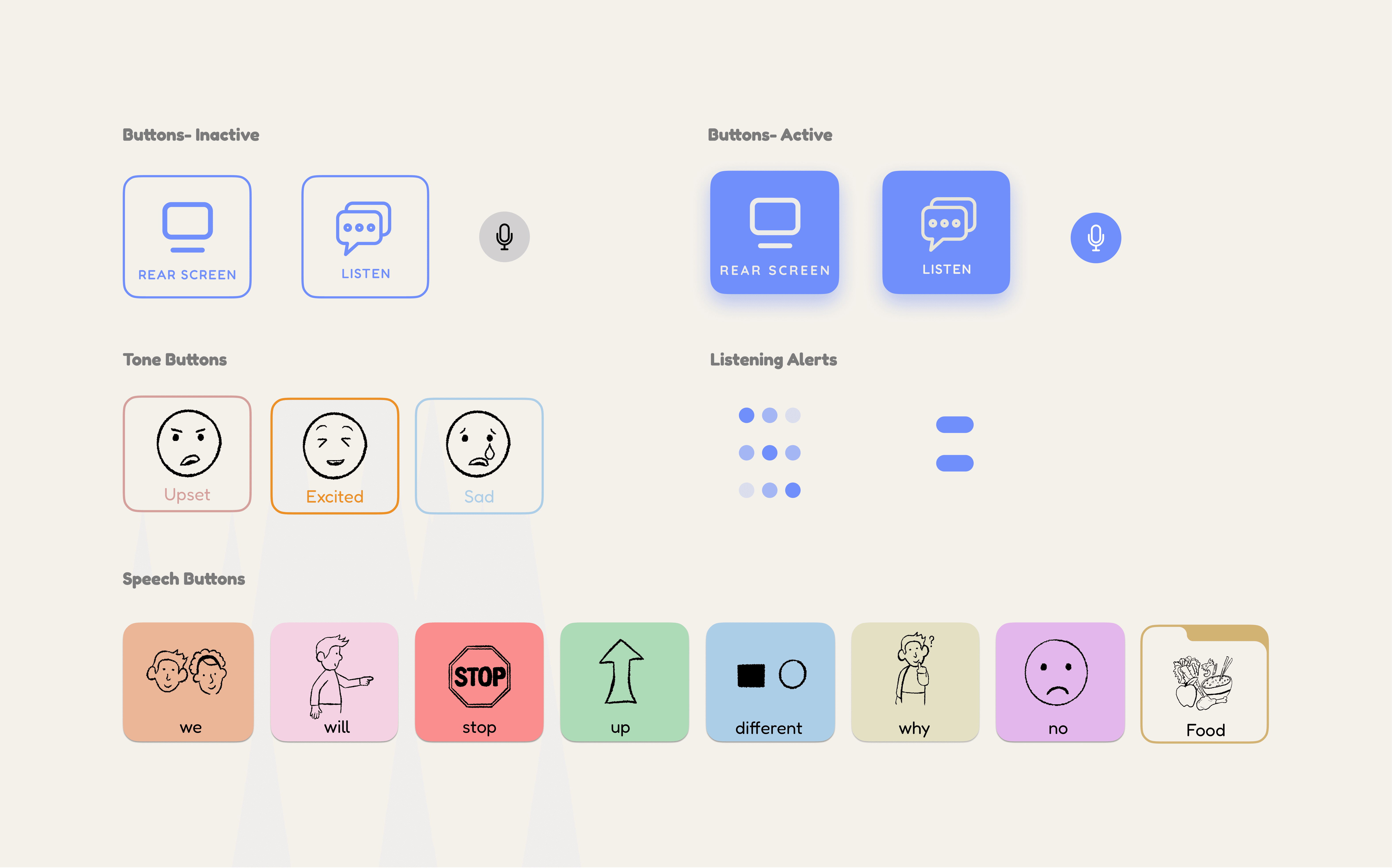
We combined pictograms with text to support users with different literacy levels. This also reinforces building written language skills.
Illustrations

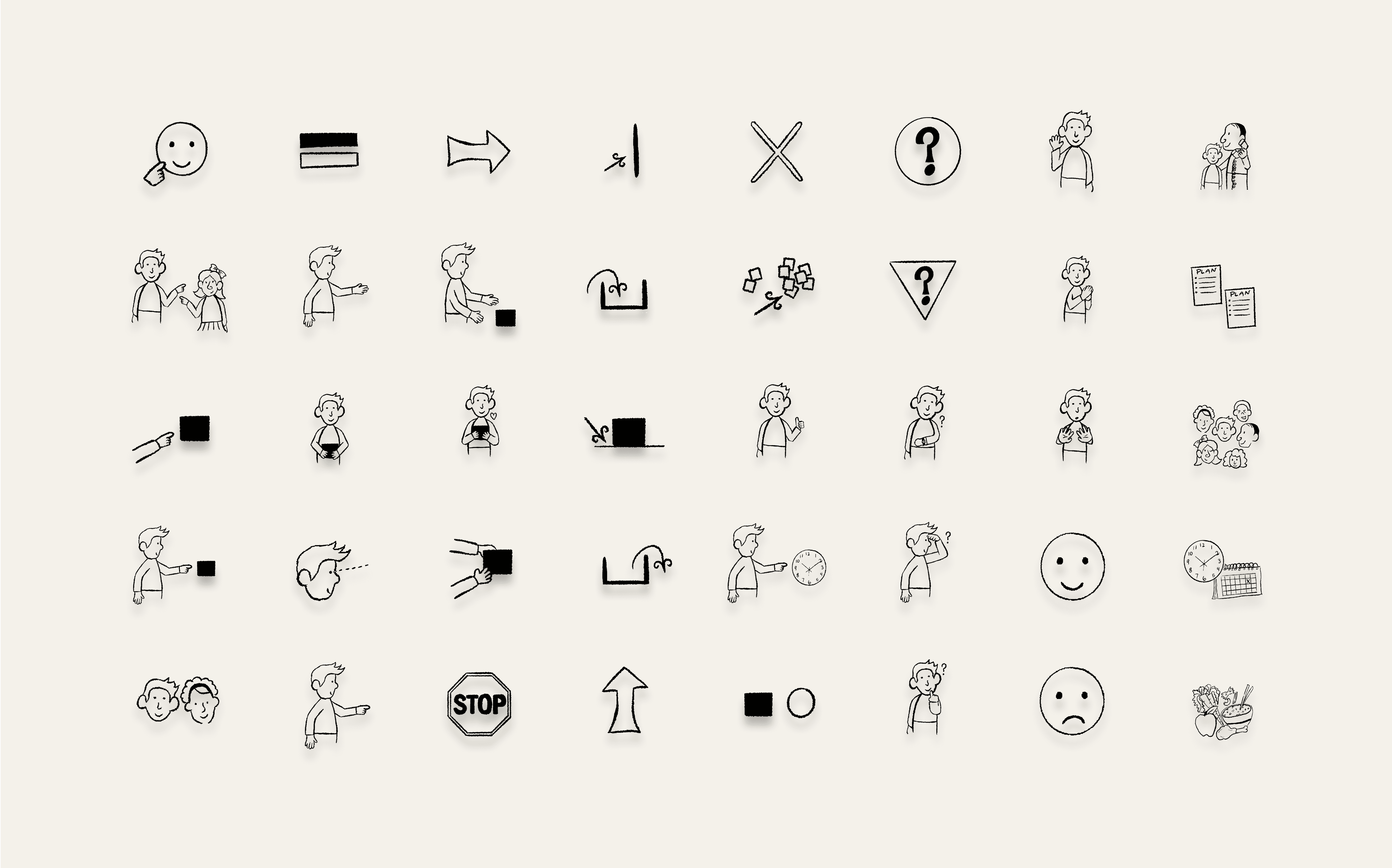
We opted for line-style drawings for quick learning and recognition. Research suggests that simple line illustrations convey meaning more effectively.
REFLECTION

What I Learned

Ground Research in Real User Needs

Designing for non-verbal autistic users taught me that accessibility goes far beyond making things "usable." Every design choice had to be grounded in research and real sensory considerations. This also reinforced a broadest best practice that designing with accessibility in mind benefits all users, not just those with specific needs.

A first look at our early wireframes, mid-fidelity screens, and initial drafts. These designs went through dozens of iterations as the project evolved. The UI design was envisioned as an AI-enhanced AAC app that was inspired by the familiar structure of Proloquo.

We grounded the interface in grid-based navigation and color-coded word types (Fitzgerald Key) to minimize frustration and build on what users already know. Early explorations centered around these features:

  • AI-generated word prediction informed by user habits and geolocation.

  • AI-generated images for custom buttons to make communication more personalized.

  • Conversation recording which could suggest entire phrases for the user to respond with.

A first look at our early wireframes, mid-fidelity screens, and initial drafts. These designs went through dozens of iterations as the project evolved. The UI design was envisioned as an AI-enhanced AAC app that was inspired by the familiar structure of Proloquo.

We grounded the interface in grid-based navigation and color-coded word types (Fitzgerald Key) to minimize frustration and build on what users already know. Early explorations centered around these features:


  • AI-generated word prediction informed by user habits and geolocation.

  • AI-generated images for custom buttons to make communication more personalized.

  • Conversation recording which could suggest entire phrases for the user to respond with.

Balance Innovation With Trust

AI features like live phrase suggestions opened exciting possibilities, but also raised questions of trust and control. I learned how critical it is to give users transparency and autonomy when the system is monitoring conversations.

A first look at our early wireframes, mid-fidelity screens, and initial drafts. These designs went through dozens of iterations as the project evolved. The UI design was envisioned as an AI-enhanced AAC app that was inspired by the familiar structure of Proloquo.

We grounded the interface in grid-based navigation and color-coded word types (Fitzgerald Key) to minimize frustration and build on what users already know. Early explorations centered around these features:

  • AI-generated word prediction informed by user habits and geolocation.

  • AI-generated images for custom buttons to make communication more personalized.

  • Conversation recording which could suggest entire phrases for the user to respond with.

A first look at our early wireframes, mid-fidelity screens, and initial drafts. These designs went through dozens of iterations as the project evolved. The UI design was envisioned as an AI-enhanced AAC app that was inspired by the familiar structure of Proloquo.

We grounded the interface in grid-based navigation and color-coded word types (Fitzgerald Key) to minimize frustration and build on what users already know. Early explorations centered around these features:


  • AI-generated word prediction informed by user habits and geolocation.

  • AI-generated images for custom buttons to make communication more personalized.

  • Conversation recording which could suggest entire phrases for the user to respond with.

Collaboration Shapes Better Outcomes

Feedback from peers, users, and heuristic evaluations helped reframe our priorities. Without those external perspectives, we might have leaned too heavily on customization rather than strengthening feedback, tone control, and usability.

A first look at our early wireframes, mid-fidelity screens, and initial drafts. These designs went through dozens of iterations as the project evolved. The UI design was envisioned as an AI-enhanced AAC app that was inspired by the familiar structure of Proloquo.

We grounded the interface in grid-based navigation and color-coded word types (Fitzgerald Key) to minimize frustration and build on what users already know. Early explorations centered around these features:

  • AI-generated word prediction informed by user habits and geolocation.

  • AI-generated images for custom buttons to make communication more personalized.

  • Conversation recording which could suggest entire phrases for the user to respond with.

A first look at our early wireframes, mid-fidelity screens, and initial drafts. These designs went through dozens of iterations as the project evolved. The UI design was envisioned as an AI-enhanced AAC app that was inspired by the familiar structure of Proloquo.


We grounded the interface in grid-based navigation and color-coded word types (Fitzgerald Key) to minimize frustration and build on what users already know. Early explorations centered around these features:


  • AI-generated word prediction informed by user habits and geolocation.

  • AI-generated images for custom buttons to make communication more personalized.

  • Conversation recording which could suggest entire phrases for the user to respond with.

LOIS KIM © 2025
MADE WITH CARE

LOIS KIM © 2025
MADE WITH CARE

LOIS KIM © 2025
MADE WITH CARE